Details of the update for the Global Lab BDO test server, which was released on Friday, April 10, 2026.
Please note that Black Desert test server update information applies specifically to the test server itself and is subject to change when the official servers are updated.
Update Barter
 Today, I would like to share with you the trading-related update news that was announced at the Calpheon Banquet. Trading (barter) is a feature that generates profit by exchanging trade goods for higher-tier, more valuable items. Typically, players travel between islands to conduct trade, and then return to a port once their inventory is full. In this update, Tier 6 and 7 trading routes have been added, connecting major ports across each continent. These new routes are characterized by lower management difficulty and the potential for greater profits compared to previous routes, as they traverse trade paths between continents that are far apart. However, to preserve the true essence of the trading content – designing and navigating your own trade routes – we have modified the system so that trade goods can no longer be transported. In addition, we have addressed other inconveniences that may have occurred during the trading (barter) process, so we ask for your continued interest in the revamped trading content.
Barter Level 2: Reduction in trade item weight
We have adjusted the weight of lower-tier trade goods to provide better accessibility for beginner captains who are just starting bartering.
- The weight of trade goods for level 2 barter has been reduced from 800 LT to 400 LT.
- This made it possible to improve the vessel’s cargo capacity when transporting trade goods from level 1 to level 2.
| Barter Sales Price and Weight Guide | ||
| level | Selling price | weight |
| level 1 | Not for sale | 100 LT |
| level 2 | Not for sale | 800LT → 400LT |
| level 3 | 1 million silver | 900LT |
| level 4 | 2 million silver | 1000LT |
| Level 5 (General) | 10 million silver | 1000LT |
| level 5 (Rare) → [Ocean] | 25 million silver | 1000LT |
| level 6 [New] | 50 million silver | 2000LT |
| level 7 [New] | 100 million silver | 2000LT |
Partial change in energy expenditure during barter
With the addition of new trade routes, will require more Parley for Barter. Accordingly, we have significantly reduced the Parley for Barter required for existing trade and divided it equally between trade goods and Crow Coins.
- The Parley for Barter required for some bartering has been changed.
- It can be further reduced due to the effect of reduced necessary Parley for Barter.
| Exchange items | Parley for Barter before change | Parley for Barter after change |
| Crow coin | 29430 | 21650 |
| 36420 | 21650 | |
| 43780 | 21650 | |
| 46544 | 21650 | |
| 58180 | 21650 | |
| [Ocean] Cox Pirates’ Journal [Ocean] Observatory Report [Ocean] Opulent Coral Trinket [Ocean] Rust Repair Tool [Ocean] Otters Fish Hook | 46544 | 14286 |
| 58180 | 14286 |
Increased exposure range of the barter button
- To enhance the convenience of bartering, the distance at which the barter button is displayed near a trading post has been increased by 20% compared to the previous level.
Removing fog from the crow’s nest
Crow’s Nest was a secret island hidden behind the fog until now. With the addition of a new trade route, it has now fully revealed itself. Large quantities of Crow Coins, previously exchanged on Hakoven Island, can now be exchanged here, and we expect many adventurers to visit.
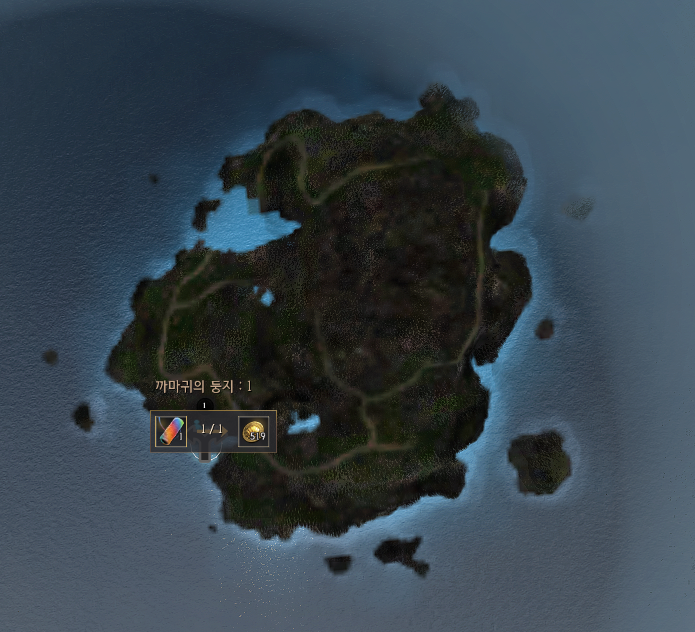
- The fog in the Crow’s Nest has cleared, and bartering for Crow Coins has begun.
- Crow Coins, which were previously exchanged on Hakoven Island, can now be exchanged at the Crow’s Nest.
- Exploration base management features have been added through Patrigio in Crow’s Nest.
- You can acquire terrain knowledge about Crow’s Nest by talking to Anax, the ferryman of Crow’s Nest.
Change in Crow Coin Exchange level
- The trade goods required to exchange Crow Coins have been changed.
| location | Trade goods required for exchange | |
| Before change | After change | |
| Halmad Island, Kashuma Island, Derko Island, Shipwrecked Cargo Ship, Incomplete Ship, Lantinia’s Combat Raft, Pakio’s Combat Raft, Crow Merchant Ship, Rickun’s Shipwreck Boat, Shipwrecked Cox Pirate’s Ship, Shipwrecked Naval Ship, Old Moon Guild Carrack, Shipwrecked Ancient Relic Transport Vessel, Cholace Chico’s Pirate Union, Wandering Merchant Ship | [Level 5] Octagonal Box [Level 5] 37 Year Old Herbal Wine [Level 5] Azure Quartz [Level 5] Stuffed Morpho Butterfly [Level 5] Statue’s Tear [Level 5] Supreme Gold Candlestick [Level 5] Faded Gold Dragon Figurine [Level 5] Stuffed White Caterpillar [Level 5] Golden Fish Scale [Level 5] 102 Year Old Golden Herb [Level 5] Portrait of the Ancient [Level 5] Elixir of Youth [Level 5] Luxury Patterned Fabric [Level 5] Mysterious Rock | [Level 4] Marine Knights’ Helm [Level 4] Stolen Pirate Dagger [Level 4] Opulent Thread Spool [Level 4] Amethyst Fragment [Level 4] Marine Knights’ Spear [Level 4] Solidified Lava [Level 4] Green Salt Lump [Level 4] Boatman’s Manual [Level 4] Old Chest with Gold Coins [Level 4] Seashell Deco [Level 4] Panacea [Level 4] Headless Dragon Figurine [Level 4] Bronze Candlestick [Level 4] Pirate’s Key |
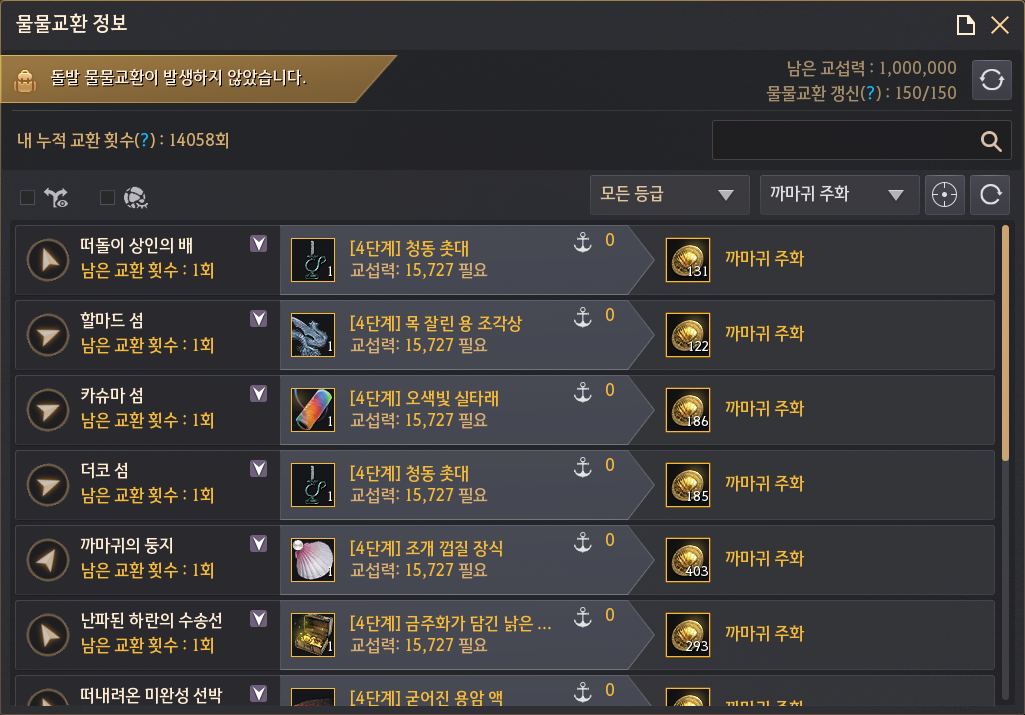
Level 5 Ocean Margoria Trade Goods Changes
With the addition of 6th and 7th level trade goods, the variety of items has increased. To prevent confusion between rare trade goods obtainable only in ‘Margoria’s Star’ and the newly added trade goods, we have organized the names and separated the categories.
- The labeling of level 5 trade goods that can be exchanged at Margoria’s Star has been changed.
- The item has been removed from the 4th → 5th level in the barter information trade classification.
- You can filter by ocean trade items.
| Before change | After change |
| [Level 5] Otters Fish Hook [Level 5] Observatory Report [Level 5] Rust Repair Tool [Level 5] Cox Pirates’ Journal [Level 5] Opulent Coral Trinket | [Ocean] Otters Fish Hook [Ocean] Observation Report [Ocean] Rust Repair Tool [Ocean] Cox Pirates’ Journal [Ocean] Opulent Coral Trinket |
Improvements to the special barter system
Special barter is a feature that appears occasionally, allowing players to acquire large quantities of Crow Coins or rare items, bringing anticipation and enjoyment to captains sailing the vast ocean. Along with this content improvement, we have updated the item list- including adjusting the amount of coins obtainable through surprises – to further highlight the significance of ‘special barter’
- The exchange list and amount of Crow Coins obtainable from special bartering have been increased.
| [Before Change] Crow Coin Acquisition Amount | [After Change] Crow Coin Acquisition Amount |
| 2,000~3,000 Crow Coins | 4,000~5,000 Crow Coins |
| 1800~2000 Crow Coins | 3,500~4,000 Crow Coins |
| 1500~1800 Crow Coins | 3,000~3,500 Crow Coins |
| 1300~1500 Crow Coins | 2,500~3,000 Crow Coins |
| 1200~1300 Crow Coins | 1,500~2,500 Crow Coins |
| 1100~1200 Crow Coins | 1200~1500 Crow Coins |
| 500~1000 Crow Coins | 1000~1200 Crow Coins |
- Some items obtainable during special bartering have been removed.
- Tidal Black Stone
- Manos Sailor’s Clothes
- II: Manos Accessories
- Accordingly, the appearance probability of III: Manos accessories has been increased.
- The following trade items have been removed from the list of items required for sudden bartering.
- Various accessories
- Level 5 trade goods
- Some level 3 trade goods
- Accordingly, the items required for exchange have been changed to gold bars or level 4 trade goods.
Notice regarding exchange items required for special barter that will be deleted
Spots for special barter
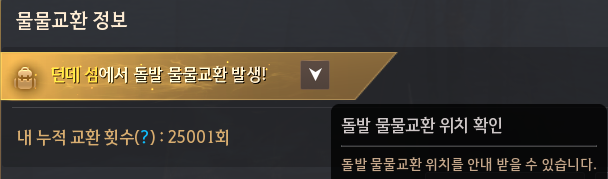
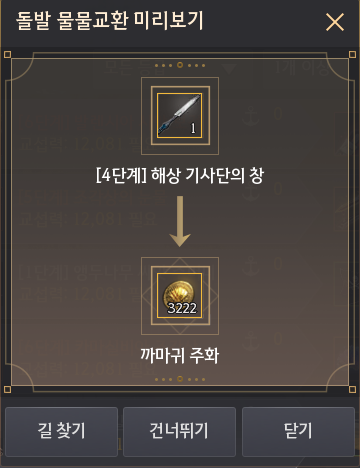
Previously, when a special barter, only the node name was displayed, making it cumbersome to locate by searching the world map or island name. Now, when a special barter, a button has been added to guide you to the target location, allowing you to receive directions with a single click.
- A UI has been added to guide users to the location of special bartering.
- The button is not displayed when a special barter does not.
- The location is displayed only when the compass function is activated when a special barter at the Margoria’s Star.
Improvement of Margoria’s Star structure
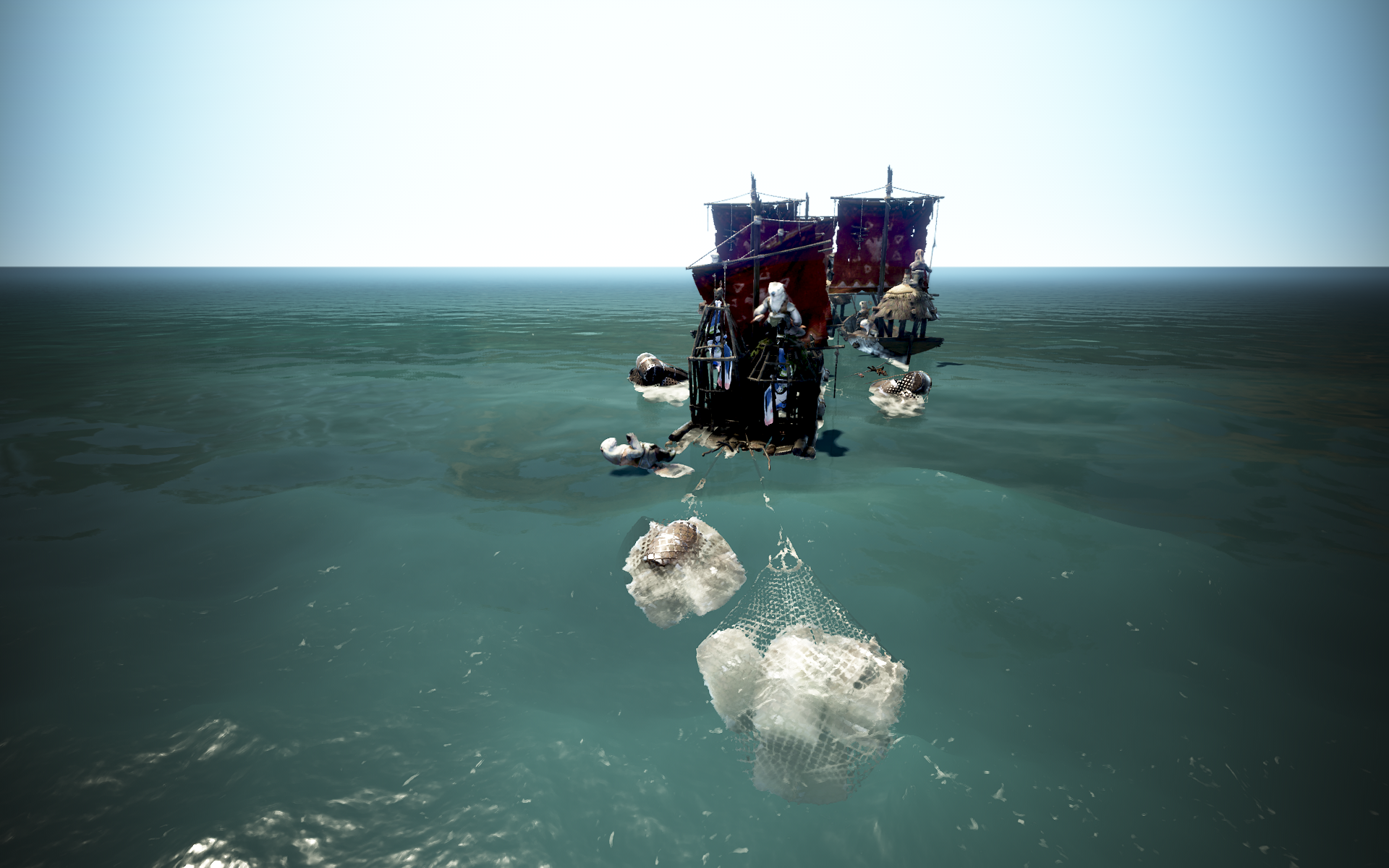
Upon arriving at Margoria’s Star, players frequently encountered difficulties with movement, such as their ships getting stuck on small objects and becoming immobile. To resolve this inconvenience, we have adjusted the positions of certain objects. Additionally, we have increased the visibility of the barter button to allow for smoother bartering.
- The locations of some structures that caused inconvenience to movement in Margoria’s Star have been changed or removed.
Pakio’s Combat Raft
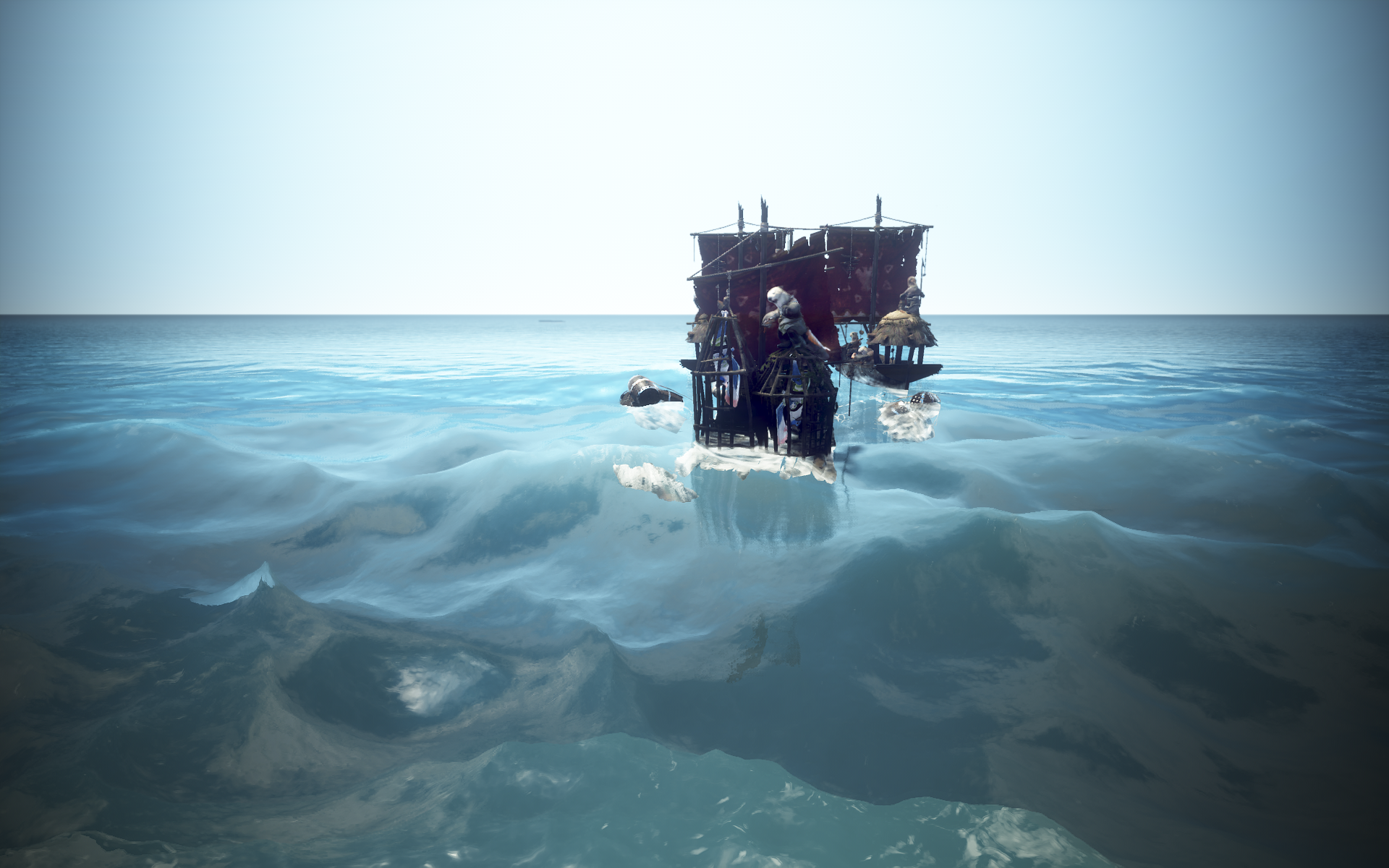
Crow Merchant Ship
Shipwrecked Cargo Ship
Cholace Chico’s Pirate Union
Old Moon Guild Carrack
Incomplete Ship
Lantinia’s Combat Raft
Shipwrecked Ancient Relic Transport Vessel
Rickun’s Shipwreck Boat
Shipwrecked Cox Pirate’s Ship
Shipwrecked Naval Ship
- Descriptions of usage and acquisition methods have been added to all trade goods items.
Added trading for level 6 and 7
As previously mentioned, new trade routes, specifically level 6 and 7, will be added. These new routes connect distant continents, making them easier to manage while offering the potential for higher profits. Along with this, a significant change is coming to the trading content. We determined that the significance of long-distance trade might diminish if transportation were possible, given the addition of trade routes between distant continents. Therefore, to preserve the true meaning of the trading content, we have modified the system so that trade goods can no longer be transported. We recommend that adventurers currently enjoying the trading content take note of this and move their trade goods to warehouses in their desired regions before the update.
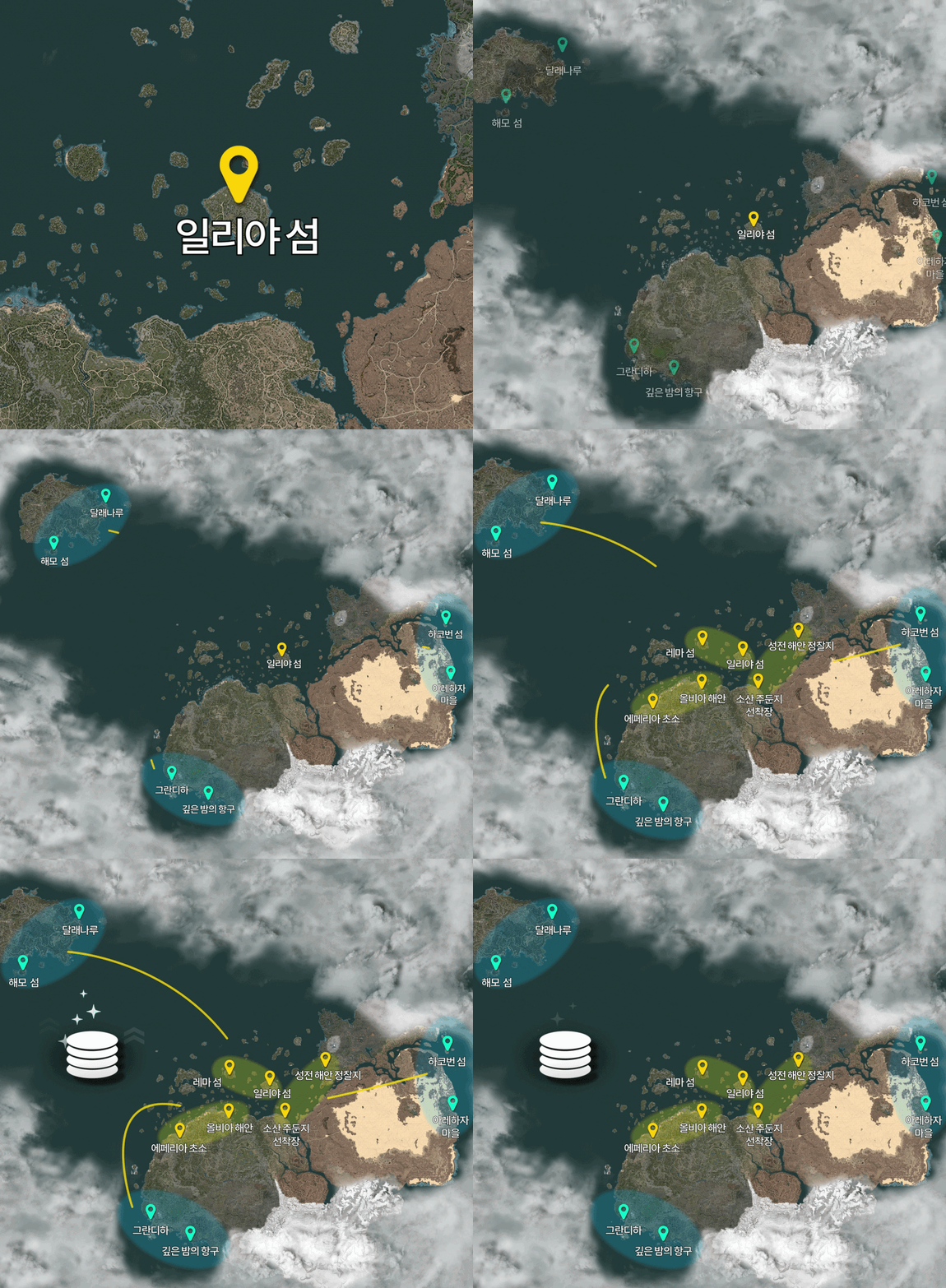
- A free trade agreement was signed on the Black Desert continent, and trade between all continents has begun.
- Barterers have been dispatched near ports on each continent and have begun offering exchanges to the adventurers.
- With the addition of new trade routes, the list of trade goods in some regions has changed.
- Lema Island, Iliya Island, Hakoven Island
- Trade goods have been changed so that they cannot be transported.
- Trade goods that have been transported or completed prior to the April 15, 2026 (Korea) and April 16, 2026 (Global) updates will be delivered to the corresponding warehouse.
- New level 6 and 7 trade items have been added.
| classification | Selling price | weight | Barter frequency requirement |
| level 6 | 50000000 silver | 2,000 LT | doesn’t exist |
| level 7 | 100000000 silver | 2,000 LT | doesn’t exist |
※ level 6 and 7 trade goods have a higher chance of being destroyed by the ship or at the dock compared to regular trade goods. (All trade goods are destroyed upon remote retrieval.)
※ You cannot move Magnus or your character while holding level 6 or 7 trade items.
| Trading level | Territory (node name) | Obtainable trade goods |
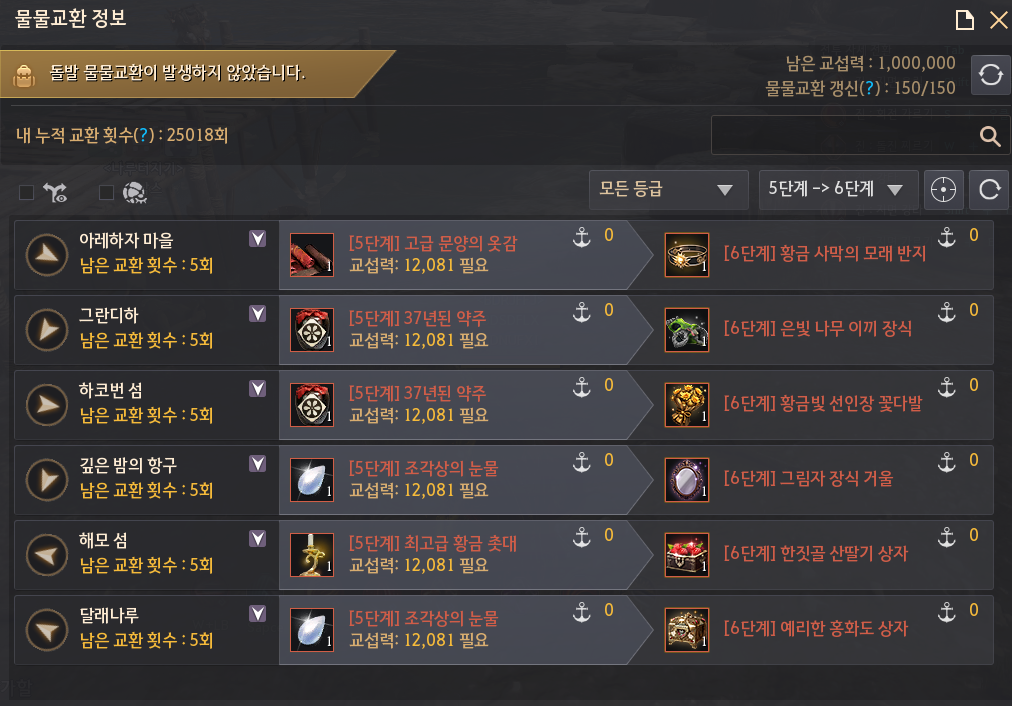
| level 5→6 | Valencia (Hakoven Island) |     [level 6] Valencia Sand Shield [level 6] Valencia Desert Sword [level 6] Colorful Camel Leather [level 6] Golden Desert Sand Ring |
| Valencia (Arehaza Village) |     [level 6] Premium Coconut Syrup [level 6] Arehaza Traditional Tea [level 6] Arehaza Lighthouse Statue [level 6] Golden Cactus Bouquet | |
| Kamasylvia (Grandiha) |     [level 6] Forest Fairy Perfume Bottle [level 6] Kamasylvia Statue [level 6] Moonlight Crystal Lamp [level 6] Silver Tree Moss Decoration | |
| [O’dyllita (Starry Midnight Port) |     [level 6] Black Rose Bouquet [level 6] Moonlight Crystal Shard [level 6] Moonlight Shadow Aged Wine [level 6] Shadow Decoration Mirror | |
| Morning Light (Haemo Island) |     [level 6] Bamboo Sap Box [level 6] Nampo Specialty Persimmon Box [level 6] Premium Box [level 6] Wild Strawberry Box | |
| Morning Light (Dallae Pier) |     [level 6] Premium Blue and White Porcelain Box [level 6] Premium Hat Chest [level 6] Brass bowl box [level 6] Sharp Safflower Box | |
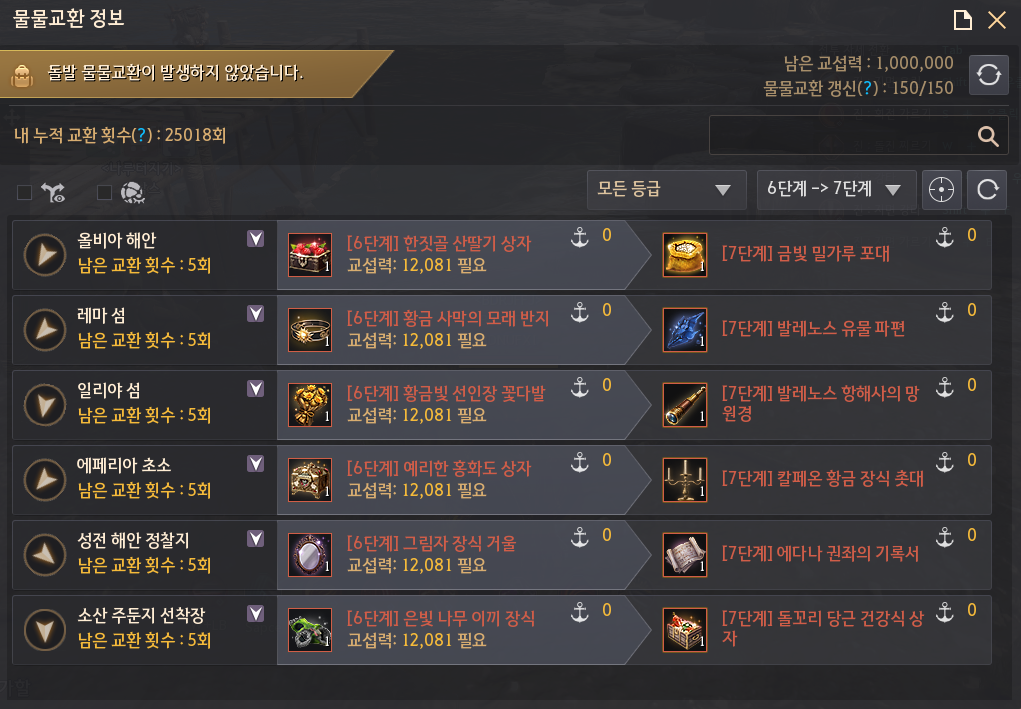
| level 6→7 | Balenos (Olvia Coast) |     [level 7] Premium Heidelberg Wine [level 7] Golden Flour Sack [level 7] Organic Honey Box [level 7] Balenos Traditional Anchor Decoration |
| Calpheon (Epheria Sentry Post) |     [level7] Golden Eagle Brooch [level 7] Calpheon Knights’ Combat Manual [level 7] Calpheon Golden Decorative Candlestick [level 7] Calpheon Artisan’s Pearl Necklace | |
| Mediahn (Sausan Garrison Wharf) |     [level 7] Sosan Military Supplies Box [level 7] Stonetail Carrot Healthy Food Box [level 7] Omar Lava Powder [level 7] Tarif’s Magic Jar | |
| Edania (Sanctuary Coastal Outpost) |     [level 7] Rusalka Thorn Bouquet [level 7] Hard Capras Wood [level 7] Harkinza Premium Perfume [level 7] The Chronicle of the Throne of Edana | |
| Balenos Islands (Iliya Island) |     [level 7] Artisan’s Shell Necklace [level 7] Balenos Navigator’s Telescope [level 7] Balenos Whale Statue [level 7] Balenos Salt Flower | |
| Balenos Islands (Lema Island) |     [level 7] Balenos Starlight Salt [level 7] Balenos Artifact Fragment [level 7] Balenos Rainbow Coral [level 7] Rainbow Seastone Shard | |
| Crow Coin Exchange | Magoria (Crow’s Nest) | Level 4 Trade Goods → Exchange for Crow Coins |
- The trading stage has been expanded as new trade goods have been added.
- Filters for level 5→ level 6 and level 6→level7 have been added to the barter information UI.
- In accordance with the barter changes, barter information (general barter, material exchange, special barter) is scheduled to be reset through regular maintenance on April 15, 2026 (Korea) and April 16, 2026 (Global).
- Filters for level 5→ level 6 and level 6→level7 have been added to the barter information UI.
Content
Altar of Blood Renewal
As introduced at the last Calpheon Banquet, the ‘Altar of Blood,’ a defense content where three party members join forces to protect a sacred relic, has been revamped. Considering that the maximum attack power currently achievable by adventurers is 395, we have introduced the Altar of Blood only up to level 21 to match this limit. As the maximum AP achievable by adventurers increases in the future, higher stages of the Altar will be opened sequentially accordingly. Additionally, please note that the ‘maximum AP limit’ is not applied inside the Altar of Blood, so the higher your AP, the faster you can defeat monsters. Meanwhile, the required AP for solo matching for level 21, the highest level among the opened sections, is set to 400, a figure currently impossible to achieve. This is a mechanism designed to guarantee a ‘Realm of Challenge’ for adventurers who wish to overcome current equipment limitations through cooperation; you can enter this level by forming a party in advance and applying for matching. In addition, we would like to inform you that we are preparing a new difficulty level featuring challenge elements for adventurers who have cleared all final level. We hope that the fierce battles against waves of enemies alongside your party members will serve as a new challenge and bring enjoyment to you.
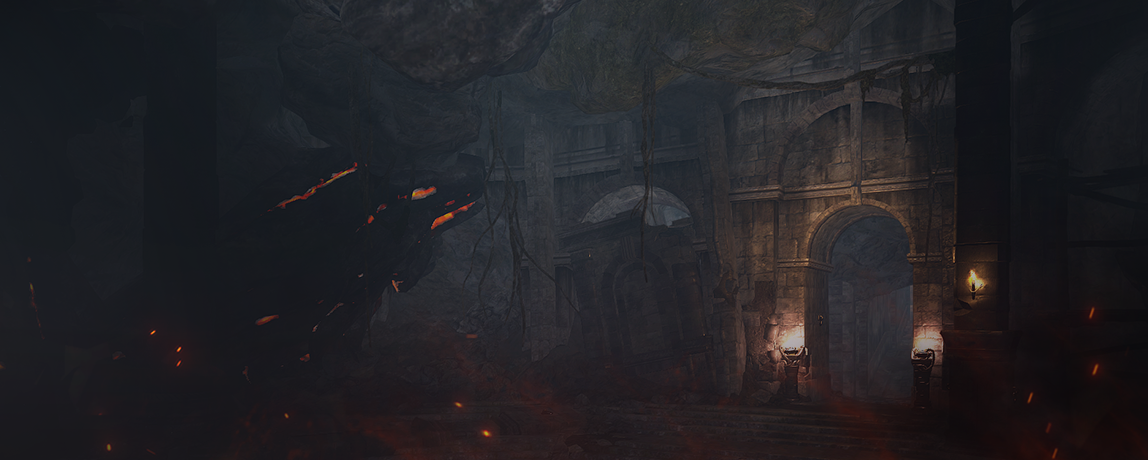
- The Altar of Blood, a slumbering rift in the abyss, has reappeared and is calling for brave adventurers to defend the sanctuary.
- The Altar of Blood can be entered via individual matching or a party of three, and it is a content where three adventurers must join forces to protect and defend the holy relic from monsters swarming from all directions, or win a battle against a boss.
- The Altar of Blood consists of a total of 21 level, and you must clear the previous level to proceed to the next.
- The maximum difficulty of the Altar of Blood may be added later.
- When forming a party for the Altar of Blood, the maximum difficulty the party can challenge will follow the lowest level among the clear records of the party members.
- If you form a party consisting of 2 adventurers who have cleared up to level 5 and 1 adventurer who has cleared up to level 3, you can only enter up to ‘Level 4’, which is the next challenge level for the adventurer who cleared level 3.
- If all challenge attempts (maximum 5) granted after the Altar of Blood match is completed are exhausted, the party will be automatically removed from the Altar of Blood.
- However, since there is no weekly limit on the number of entries to the Altar of Blood, you can apply for a match again at any time after exiting to re-enter.
- Apart from weekly rewards, you can obtain an additional reward once per family when you clear each difficulty level of the Altar of Blood for the first time.
- Your Blood Altar clear record will not be reset and will be retained. When you challenge it again, you can continue from the highest level you previously achieved.
※ Altar of Blood Playstyle
The Altar of Blood is divided into normal phases and boss phases .
In the normal phase, the main objective is to defeat the monsters swarming toward the central sacred relic to prevent them from approaching it.
In the normal level, when a monster reaches the sacred object, the sacred object’s HP decreases, and if the sacred object’s HP reaches 0%, the stage fails.
In the boss phase, a designated boss appears, and the main objective is to defeat the boss by performing mechanics.
The boss enters a berserk state 6 minutes after appearing, and during the berserk state, the boss’s AP and DP increase significantly.
If you fail to defeat the boss within 8 minutes of its appearance, you will fail that level.
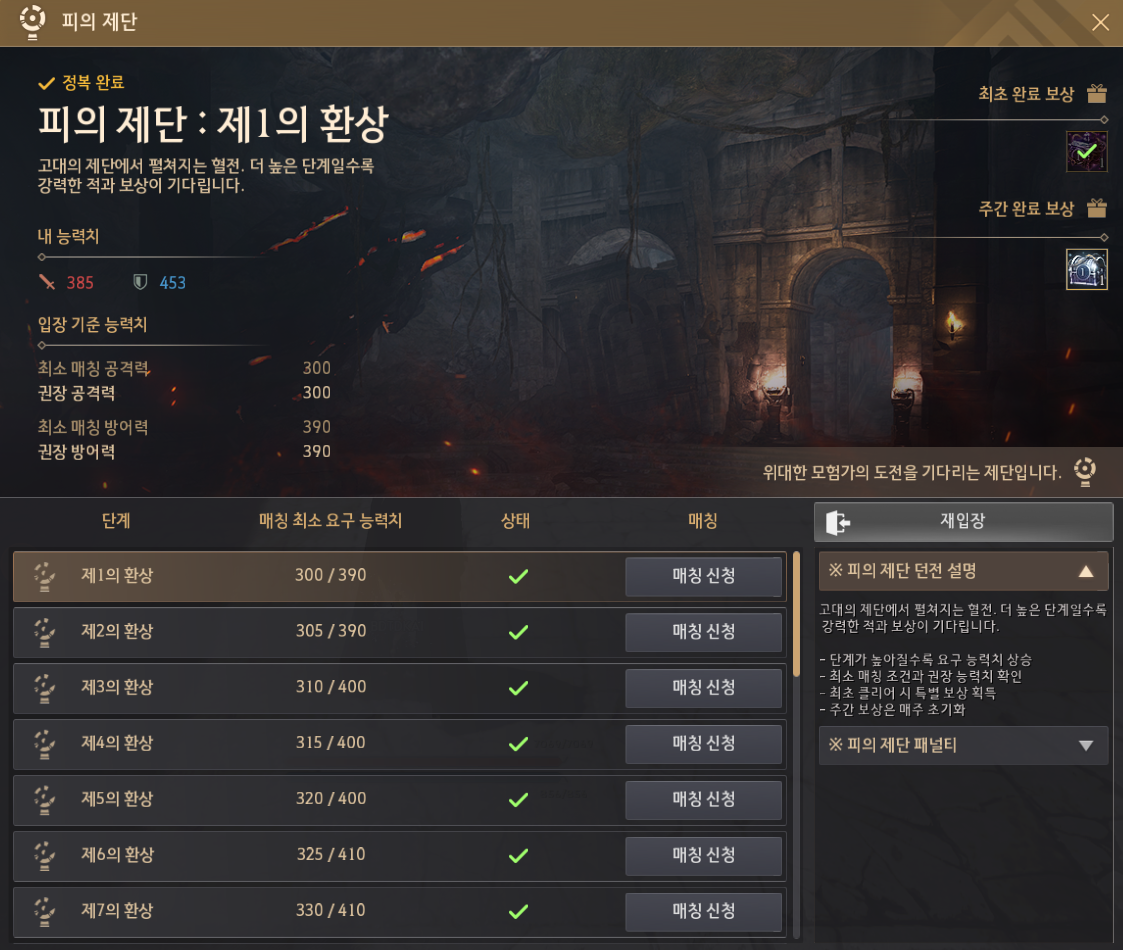
- The Altar of Blood consists of a total of 21 level, from the 1st to the 21st level.
- When applying for a solo match, you must meet the minimum required AP and DP for each level.
- When applying for matchmaking in a 3-person party, you can challenge the Altar of Blood even if you do not meet the minimum required AP and DP.
- The maximum required matching ability for each level is as follows. (Higher levels may be added in the future.)
| level | division | Minimum required AP (based on listed stats) | Minimum required DP (based on listed stats) |
| 1 | common | 300 | 390 |
| 2 | common | 305 | 390 |
| 3 | boss | 310 | 400 |
| 4 | common | 315 | 400 |
| 5 | common | 320 | 400 |
| 6 | boss | 325 | 410 |
| 7 | common | 330 | 410 |
| 8 | common | 335 | 420 |
| 9 | boss | 340 | 430 |
| 10 | common | 345 | 430 |
| 11 | common | 350 | 430 |
| 12 | boss | 355 | 430 |
| 13 | common | 360 | 430 |
| 14 | common | 365 | 440 |
| 15 | boss | 370 | 440 |
| 16 | common | 375 | 440 |
| 17 | common | 380 | 440 |
| 18 | boss | 385 | 450 |
| 19 | common | 390 | 450 |
| 20 | common | 395 | 450 |
| 21 | boss | 400 | 460 |
- The method of participating in the Altar of Blood is as follows.
- Apply for matchmaking from Menu (ESC) – War (F7) – Altar of Blood menu
- If you form a 3-person party and apply for matching, you will enter with your party members; if you apply without forming a party, you can join a party with any other random adventurer who has also applied for matching.
- When entering the Altar of Blood, the party leader may change depending on the order of entry.
- Apply for matchmaking from Menu (ESC) – War (F7) – Altar of Blood menu
※ Altar of Blood Procedure Rules
– After entering, the party leader can select the level to enter.
– When the party leader selects a level and presses the game start button, that level begins immediately.
– Resurrection is impossible upon death at the Altar of Blood. (Cannot be revived using Witch/Wizard’s Resurrection skill or Medical Kit )
– When you clear or fail each level, all characters are revived and their HP is restored.
– If all three party members die, the level fails, all monsters disappear, and you revive with your HP restored. At this time, the level selection window is displayed.
– You cannot use the Camp, Maid, World Map, Request UI, and Minimap UI at the Altar of Blood.
– It is impossible to gain combat or skill experience points by defeating monsters at the Altar of Blood.
– Effects that increase item drop exp/Skill Points do not apply at the Altar of Blood.
– If you do not start a battle or make any progress for 10 minutes after entering the Altar of Blood, you will be automatically removed from the altar.
- You can obtain weekly rewards and first-time rewards when you clear each level of the Altar of Blood.
- Weekly Rewards
- Based on the records achieved each week, it will be automatically distributed to the Black Spirit’s Gift Box at 00:00 on Sunday. (Claimable once per family per week)
- Rewards exist for each level, and can be obtained only once based on the highest clear level reached in that week.
- Example) Even if you clear level 10, 15, and 20 all within a week, rewards do not accumulate, and only the highest record, the ‘Level 20 Weekly Reward,’ is given.
- First reward
- When you clear each level for the first time, it will be automatically given to the Black Spirit’s Gift Box (B).
- As the reward level increases, the variety, quantity, and probability of obtaining items increase.
- Weekly Rewards
| Altar of Blood Reward Example – Level 21 | ||
| Weekly Rewards | First reward | |
| Acquired according to a specified probability | Guaranteed acquisition within the specified quantity | Guaranteed acquisition |
      Gold Bar Box x14 (Can obtain 3 to 10 1kg Gold Bars upon opening) Luminous Origin of Dark Hunger х4 Luminous Essences of Dark Hunger х9 Advice of Valks (+300) Advice of Valks (+250) Advice of Valks (+200) |       Gold Bar Box x4 (Can obtain 3 to 10 1kg Gold Bars upon opening) Luminous Origin of Dark Hunger х1 Advice of Valks (+100) Trace of Nature 24~29 Sealed Black Magic Crystal 60~65 Caphras Stone 80~85 Ancient Spirit Dust 80~85 Black Stone 120~125 | Luminous Origin of Dark Hunger х1 Luminous Essences of Dark Hunger х3 Gold Bar Box x3 (Can obtain 3 to 10 1kg Gold Bars upon opening) Advice of Valks (+200) |
| Altar of Blood Reward Example – level 11 | ||
| Weekly Rewards | First reward | |
| Acquired according to a specified probability | Guaranteed acquisition within the specified quantity | Guaranteed acquisition |
   Gold Bar Box x4 (Can obtain 3 to 10 1kg Gold Bars upon opening) Origin of Dark Hunger x1 Advice of Valks (+170) Advice of Valks (+150) |  Gold Bar Box x2 (Can obtain 3 to 10 1kg Gold Bars upon opening) Origin of Dark Hunger x1 Advice of Valks (+80) Trace of Nature 15~20 Sealed Black Magic Crystal 45~50 Caphras Stones 60~65 Ancient Spirit Dust 60~65 Black Stone 70~75 | Luminous Essences of Dark Hunger x2 Gold Bar Box x1 (Can obtain 3 to 10 1kg gold bars upon opening) Advice of Valks (+100) |
| Altar of Blood Reward Example – level 1 | |
| Weekly Rewards | First reward |
| Guaranteed acquisition within the specified quantity | Guaranteed acquisition |
  Gold Bar Box x 1 (Can obtain 3 to 10 1kg Gold Bars upon opening) Origin of Dark Hunger x1 Advice of Valks (+50) Advice of Valks (+40) Trace of Nature 10-15 Sealed Black Magic Crystal 15~20 Caphras Stones 25~30 Ancient Spirit Dust 25~30 Black Stone 25~30 |   Luminous Essences of Dark Hunger x1 Gold Bar Box x 1 (Can obtain 3 to 10 1kg gold bars upon opening) Advice of Valks (+70) Advice of Valks (+60) |
- Luminous Origin of Dark Hunger, which can be used starting from an enhancement probability increase value of 300 and up to a maximum of 350, and Luminous Essences of Dark Hunger, which can be obtained by heating 4 of them to acquire Luminous Origin of Dark Hunger, have been added.
- Luminous Origin of Dark Hunger increases the enhancement probability increase value by 1 per item when used at a value of 300 or higher.
| Item name | Source of acquisition | central market lower limit | central market upper limit |
Luminous Origin of Dark Hunger | (1) Guaranteed acquisition as a weekly reward upon clearing level 15 or higher + additional acquisition based on specified probability (2)Guaranteed acquisition upon first clearing level 15 or higher | 1,500,000,000 | 6,000,000,000 |
Luminous Essences of Dark Hunger, | (1) Obtained as a weekly reward with a specified probability upon clearing level 15 or higher (2)Guaranteed acquisition upon first clear of level 1 or higher | 375,000,000 | 1,500,000,000 |
- The ‘Altar of Blood’ item has been added to the ‘Recruit Post → Select Content List’ in the Party/Unit Finder UI.
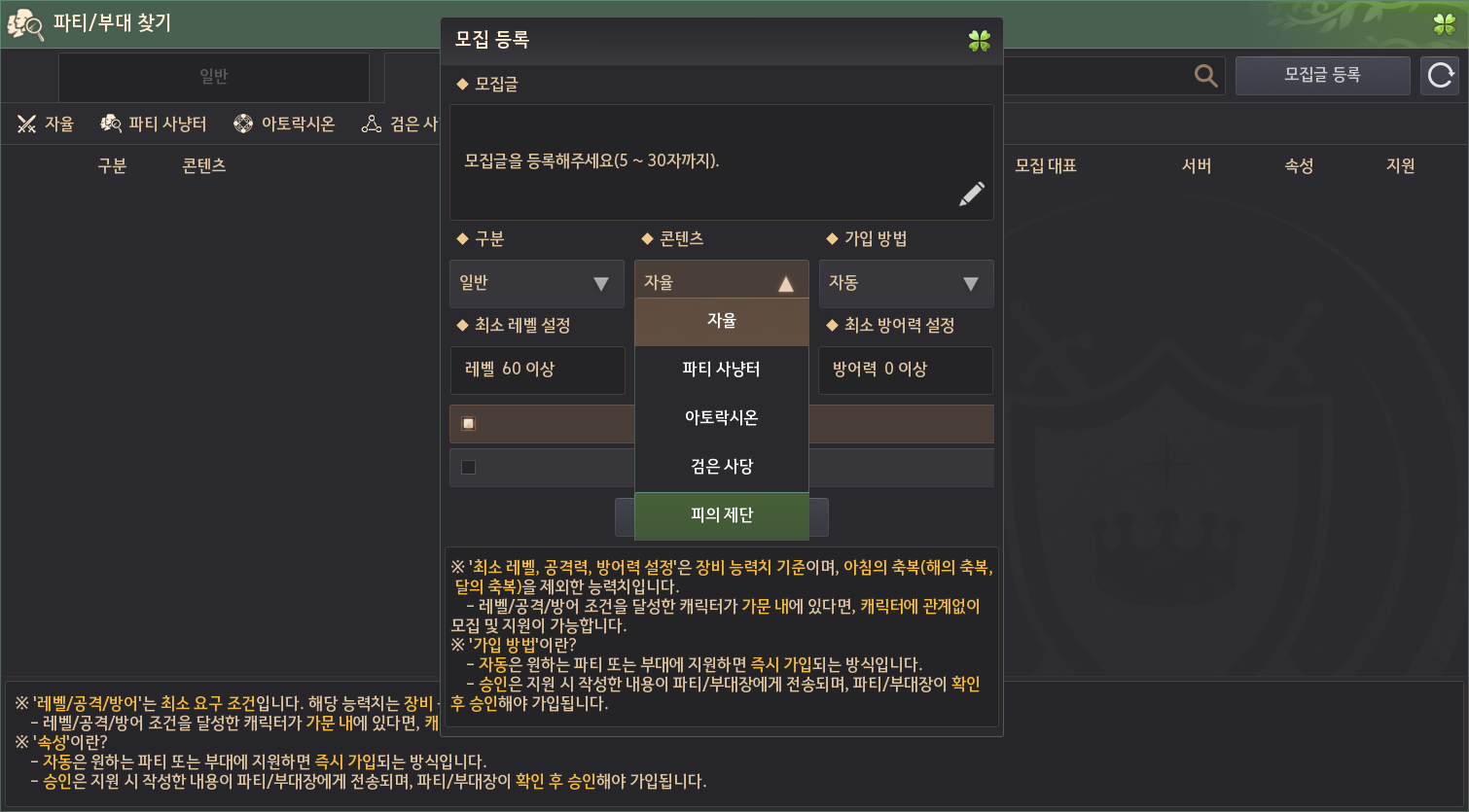
※ The Altar of Blood content cannot be viewed in the Black Desert Research Lab and is scheduled to be applied to the official servers.
Increasing revenue from inland fishing
The improvements to inland fishing, which began in Heidel and continued through each territory, have now reached their final destination, the Morning Light and Edania.
We would like to thank the adventurers who enjoy the fishing content, and we ask for your continued interest and participation in the ongoing weekly fishing tournament.
- Rumors are being heard that an ecosystem of rare fish has formed along the waters of Edania, theMorning Light.
- Koi have started appearing at Gyeonghoeru Pavilion, and the probability of koi appearing in other inland areas has increased by approximately 10.2 times.
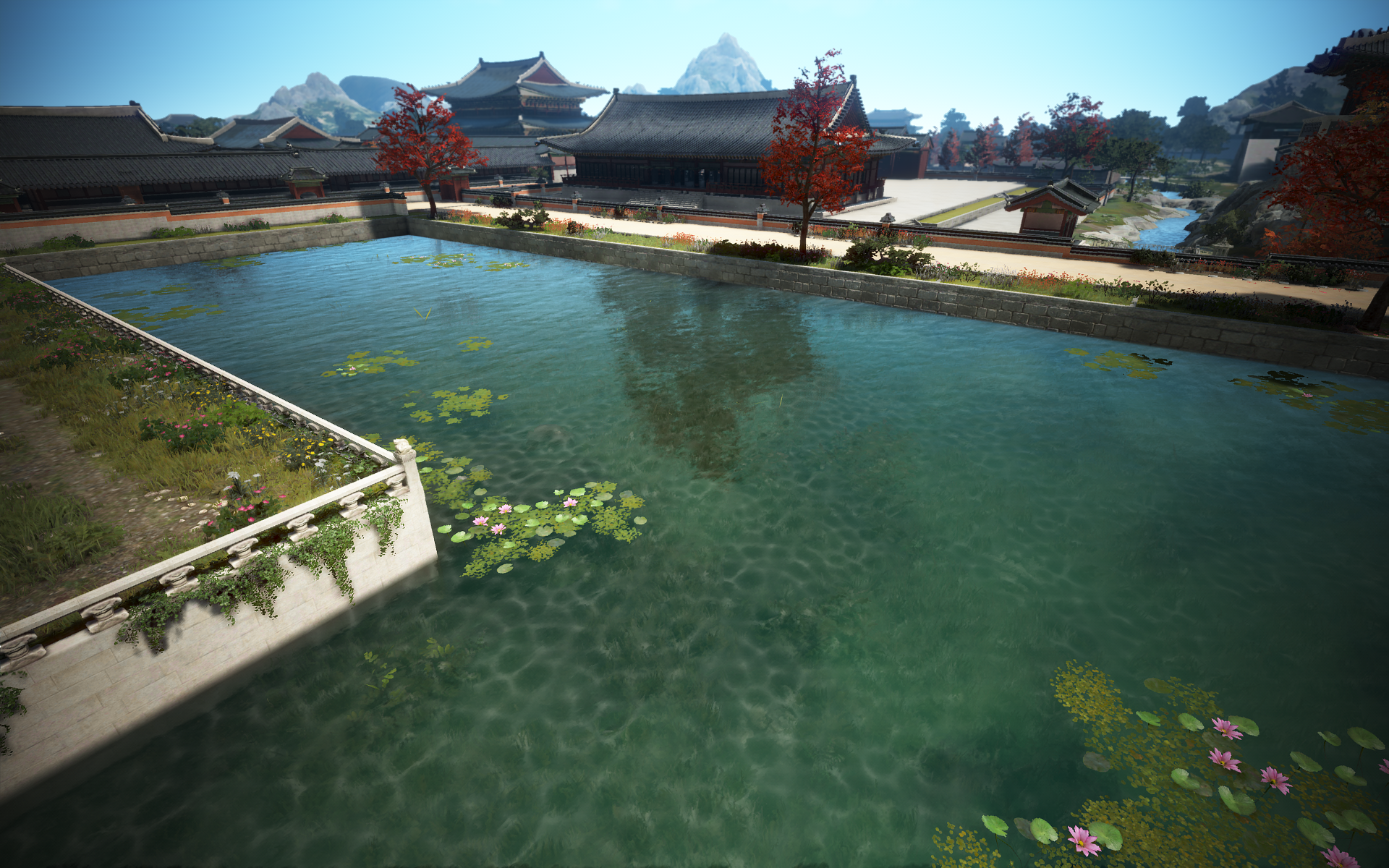
- The appearance probability of Polka-dot Stingray in some Lake Edania has increased by approximately 1.2 times.
“Mirror” rotation
- The class of the transition rotation has been changed to Drakania, Guardian.
- During the period below, you can transfer items to the Drakania, Guardian class for just 1 silver.
- Korea: After the scheduled maintenance on April 15, 2026 (Wed) ~ Before the scheduled maintenance on May 6, 2026 (Wed)
- Global: After the scheduled maintenance on April 16, 2026 (Thu) ~ Before the scheduled maintenance on May 7, 2026 (Thu)
- During the period below, you can transfer items to the Drakania, Guardian class for just 1 silver.
Item
Treasure Recognition Method
In Black Desert, there are three types of treasures that players must identify to determine their type. This method of obtaining treasures generated excitement and anticipation during the identification process after receiving the item. However, over time, information about which monsters drop treasures became widely known, allowing most adventurers to check the item type in advance through system messages or drop locations. Consequently, we believe the excitement and joy experienced during the identification process when treasures first appeared has diminished somewhat. Therefore, to simplify treasure identification, we have removed the identification method for treasure fragments and modified the system so that the item type can be checked immediately upon receipt.
- Improvements have been made to allow treasure fragments to be identified without recognition.
- The applicable treasure items are the Archaeologist’s Map, Lafi Bedmountain’s Upgraded Compass, and the Rich Merchant’s Ring.
- Due to improvements being made to allow fragments to be distinguished without the need for recognition, the dialogue button for recognition on the next NPC has been removed.
- Caphras’s Journal (Archaeologist’s Map)
- Ain Greid (Lafi Bedmountain’s Upgraded Compass)
- Shakatu (Rich Merchant’s Ring)
- Some dialogue in the summary description of the ‘Lafi Bedmountain’s Upgraded Telescope’ request has been changed.
- It has been added so that you can acquire knowledge about material items if you possess the Archaeologist’s Map, Lafi Bedmountain’s Upgraded Compass, Rich Merchant’s Ring, and material items from the Crow’s Nest Lavala NPC.
- However, the existing knowledge acquisition functions through Caphras’s Journal, Ain Greid, and the Shakatu NPC will be retained.
| Types of treasure | Before change | After change |
| Archaeologist’s Map |  you receive an unrecognized item |     you receive an already recognized object |
| Lafi Bedmountain’s Upgraded Compass |  you receive an unrecognized item |    you receive an already recognized object |
| Rich Merchant’s Ring |  you receive an unrecognized item |      you receive an already recognized object you receive an already recognized object |
Request, knowledge
Olvia Academy 2nd Class Admission
- Admission for the 2nd class of Olvia Academy begins.
- If you obtained Family Rewards (Combat/Life), Knight Titles, and Academia Outfit Boxes by completing the Academy in Season 1, you cannot obtain them again; additional rewards are only available for Academy Pass rewards.
| Olvia Academy 2nd Cohort Admission Schedule |
| Korea: After the scheduled maintenance on April 15, 2026 (Wed) ~ Before the scheduled maintenance on July 15, 2026 (Wed) Global: From after the scheduled maintenance on April 16, 2026 (Thu) until 23:59 on July 15, 2026 |
- Any student at Olvia Academy can accept weekly requests from the Olvia Academy request board and Cliff.
- Weekly requests for Olvia Academy Season 2 can be accepted during the following period.
| Olvia Academy 2nd Cohort Admission Schedule |
| Korea: From 00:00 on April 16, 2026 (Thu) ~ Until the scheduled maintenance on July 15, 2026 (Wed) Global: From after the scheduled maintenance on April 16, 2026 (Thu) until 23:59 on July 15, 2026 (Wed). |
Olvia Academy 1st Cohort Closing Notice
- As Olvia Academy Season 1 concludes during the scheduled maintenance on April 15, 2026 (Korea) and April 16, 2026 (Global), all families that have not yet graduated will be automatically processed as graduated.
- All lecture requests that were in progress or completed in the first semester will be reset, and you can proceed with them again upon re-enrollment.
Olvia Academy Improvement
- The following details have been changed regarding the Olvia Academy request.
- The quest objective for ‘[Fishing Course] Maximize Distance Bonus’ has been changed to hearing an explanation about distance bonuses from Kurio.
- The number of Feather Wolves to kill in the quest objective ‘[Hunting Course] Hunting in Kamasylvia’ has been changed to 5.
- The completion condition for the quest ‘[Hunting Course] Proof: Wildspark’ has been changed to 100 Wildspark.
- The main guide for the quest ‘[Combat Course] Solid Foundation’ has been changed to explain how to inflict special damage rather than down attacks.
- The quest name ‘[Sailing Course] Ship Support’ has been changed to ‘[Sailing Course] Ship Support I’.
- The Ship Registration Certificate: Epheria Light Frigate has been removed from the rewards for the quest ‘[Sailing Course] Toward the Balenos Archipelago’.
- The quest ‘[Sailing Course] Ship Support II’ has been added, allowing you to obtain the Ship License: Epheria Sailboat from the NPC Lodovica while progressing through the quest ‘[Sailing Course] Start Trading with Barter’.
- With the addition of the ‘[Sailing Coursen] Ship Support II’ quest, the objective ‘[Sailing Course] Safe Voyage with Ship Repair Materials’ has been changed.
- The ‘[Sailing Course] Ship Support II’ quest can only be completed once per family, regardless of Olvia Academy class number.
- Families that obtained the Ship License: Epheria Sailboat item through the quest reward ‘[Sailing Course] Toward the Balenos Archipelago’ during Olvia Academy Season 1 cannot proceed with the ‘[Sailing Course] Ship Support II’ quest.
- A [Sailing Course] Material Support quest has been added, allowing you to obtain Ash Plywood from the NPC Lodovica while progressing through the ‘[Sailing Course] Safe Sailing with Ship Repair Materials’ quest.
- With the addition of material support requests, the objective ‘[Sailing Course] Safe Voyage with Ship Repair Materials’ has been changed.
- Some of the following request summary descriptions have been improved.
- [Combat Course] Pirate Crew Treasure Map?
- [Training Course] Let’s Meet the Foal
- Reward items obtainable upon completing the quests below have been added.
- ‘[Gathering Course] Challenge, Rough Stone Mining!’ – Added 2 Florin Recipe Books
- ‘[Hunting Course] Hunting in Odilita’ – Added 2 Florin Spellbooks
- ‘[Fishing Course] New Client, Imperial Supply’ – Marvelous Balacs Lunchbox and Triple-Float Fishing Rod
Changes to Olvia Academy Common Tools
To the graduates of the 1st class of the Shining Academy, we extend our sincere gratitude for your enjoyment of Olvia Academy. With the launch of Olvia Academy, shared cooking and alchemy tools were introduced for the first time. We felt it would be very inconvenient for adventurers to have to return to their residences to cook and perform alchemy during class, so this feature was added for the convenience of the Academy students. Of course, being a graduate does not mean you are prohibited from returning to school, but a cap has been applied to the number of consecutive production attempts to allow the incoming 2nd class students to use the shared tools more comfortably. We ask for your understanding and look forward to your interest and guidance for the new students of the upcoming 2nd Academy. Thank you.
- When using Olvia Academy shared tools, it has been changed so that you can craft up to 1,000 items per crafting attempt.
- The Olvia Academy shared tools have been installed for students who have enrolled in the school to learn Cooking and Alchemy. As these are shared tools, we kindly ask that you refrain from using them for extended periods. -Justin Bartali-
Shai – Donkey Acquisition Quest Added
A new quest has been added so that you can once again obtain the special donkey that was previously provided only once per family for the Shai class. Some of you may have been disappointed that there is no way to obtain these donkeys again, especially if you acquired them during your first adventure in Black Desert and then sold them at the stable or discarded them after switching to a horse. In particular, since the Shai class allowed you to experience a unique vibe, such as lying down on the saddle or sitting backward while riding the donkey, we hope that the addition of this quest will further enhance the enjoyment of your adventure.
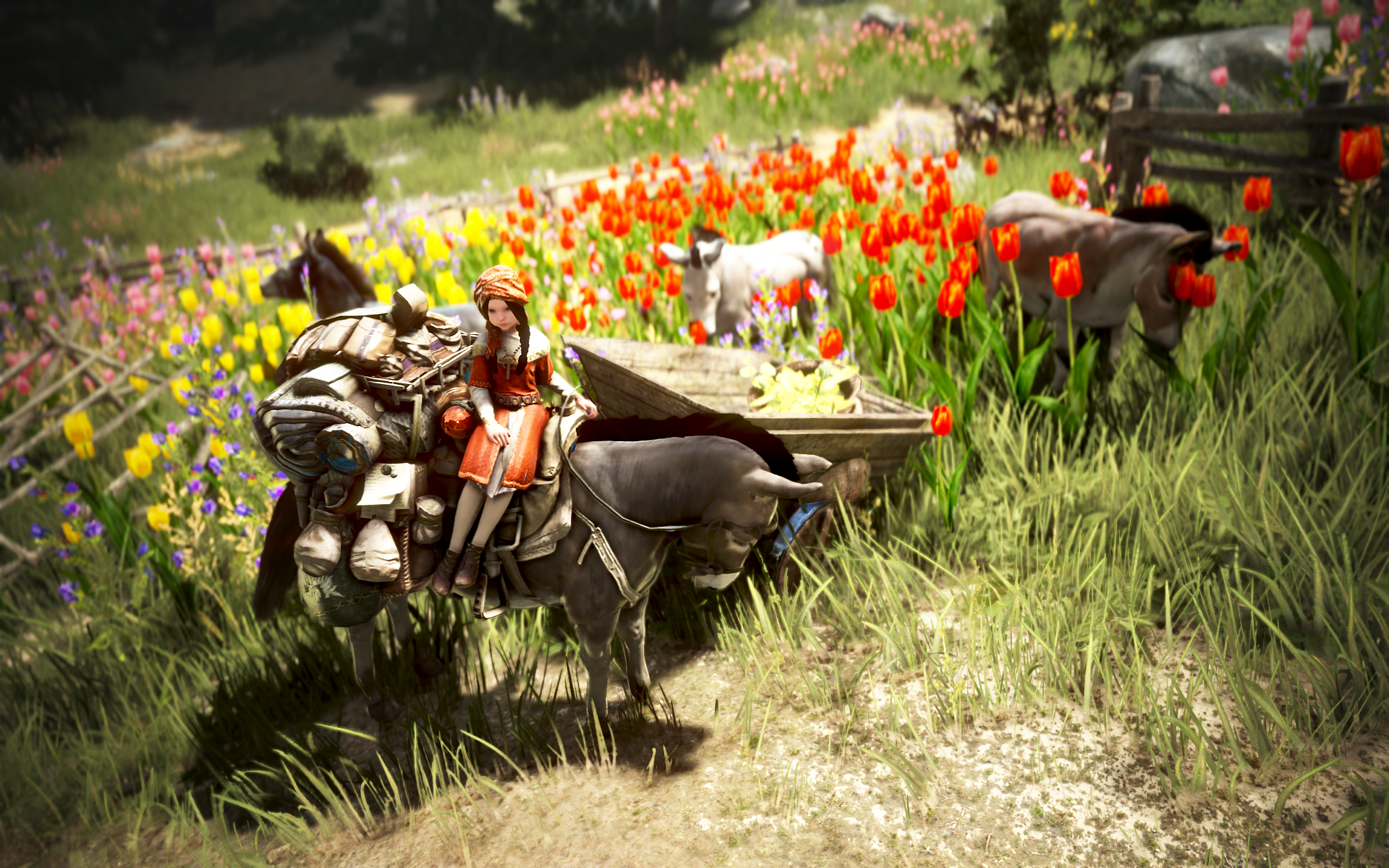
- A quest to acquire a donkey, playable with the Shai class, has been added.
- ‘A small and reliable friend, with a donkey!’, ‘A donkey friend to be with me!’
| Order Acceptance NPC | Order conditions | compensation |
| Radina, the <Donkey Trainer> in front of Florin Village | Level 20 or higher Shai Class Once per family ※ You can accept orders when the ‘General’ order type is activated. | A small and reliable friend, with a donkey! 5 Special Carrot A donkey friend to join me! Choose one from: Donkey Emblem: Derome the Donkey, Donkey Emblem: Cherose the Donkey, or Donkey Emblem: Vallet the Donkey |
- Recommended Request – The ‘[Mount] Fluffy Alpaca’ tab has been changed to ‘[Mount]Shai: Fluffy Alpaca’.
- The name and acceptance dialogue of the ‘Two Faces of a Hero’ quest, which can be accepted from the Black Spirit after accepting the ‘How a Merchant Guild Survives’ quest from Phobius in Grana, have been partially improved to indicate that this is a branch quest.
- Request Title: ‘[Branch] The Hero’s Two Faces’
- Improvements have been made so that when you press the Sanctuary (Church) button in the NPC search at the top right for the Grey Biants NPC at Olvia Academy, you will be guided to the right path.
UI
World map search function improvement
The World Map is one of the most frequently used screens by many adventurers to check travel routes, manage bases, and locate necessary NPCs or functions. However, were received feedback that the search function was limited in the range of items searchable and that it was difficult to quickly find desired destinations because frequently used information was scattered across various UIs. In response, this update improves the design of the World Map search bar and adds a feature that allows for integrated searching of various information within a single bar. We will continue to make improvements so that the World Map goes beyond simply checking locations and becomes an even more convenient tool that supports adventurers’ exploration, daily life, and overall growth.
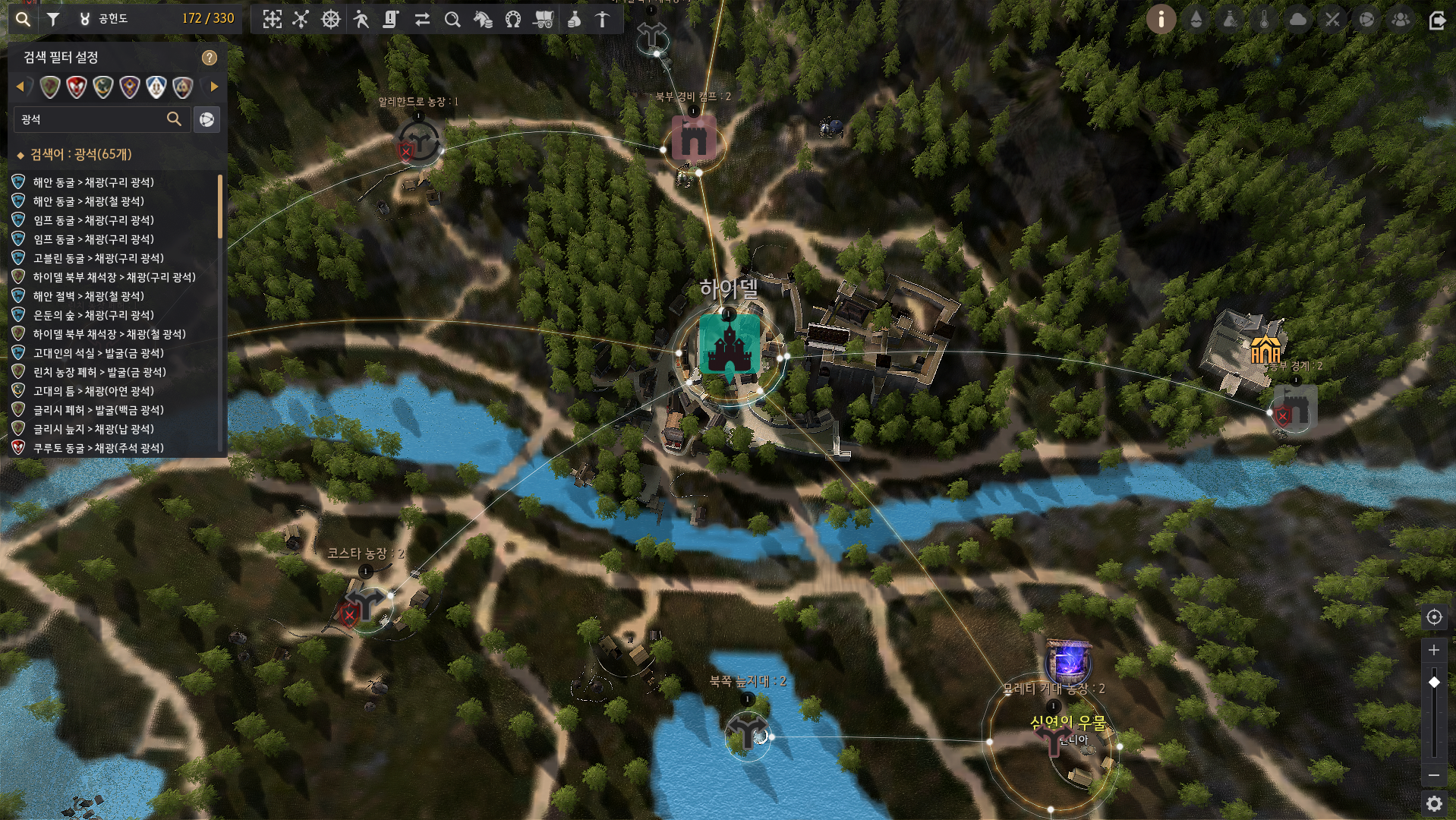
- The world map search function has been improved for greater convenience.
- The design of the World Map search bar has been changed, and it has been improved to allow searching for various information in a single search bar.
- You can check the following items in the search bar.
- node production resources
- node name
- NPC Name
- Key functions such as warehousing and repair
- The production node filter in the production base information has been integrated into the button to the right of the search bar.
- The function of navigating by clicking on major cities and villages in the search list has been changed to the territory icon button at the top of the search bar, and you can use it in the same way.
- Additionally, search results are displayed even if you do not possess knowledge of the terrain or the corresponding NPC, and the camera now moves to that location when a search result is clicked.
Boss information improvement
Many adventurers are actively participating in boss hunting content, including World Bosses, Field Bosses, the Dark Rift, and Hunting Bosses. However, previously, information related to bosses was scattered, making it difficult to determine at a glance which content to proceed with or where to proceed. To address this, we have improved convenience by creating an integrated UI that allows you to view boss-related information at a glance. Through the Boss Information UI, you can now check the time remaining until a boss appears and its remaining health after spawning. Additionally, selecting a desired boss from the list will provide route guidance to its location. This UI is accessible via a separate menu and is also configured to open when you click the familiar Dark Rift Boss UI located in the bottom right corner, so we hope you make good use of it. We will continue to make improvements to ensure adventurers can access information about the content they desire more easily and conveniently.
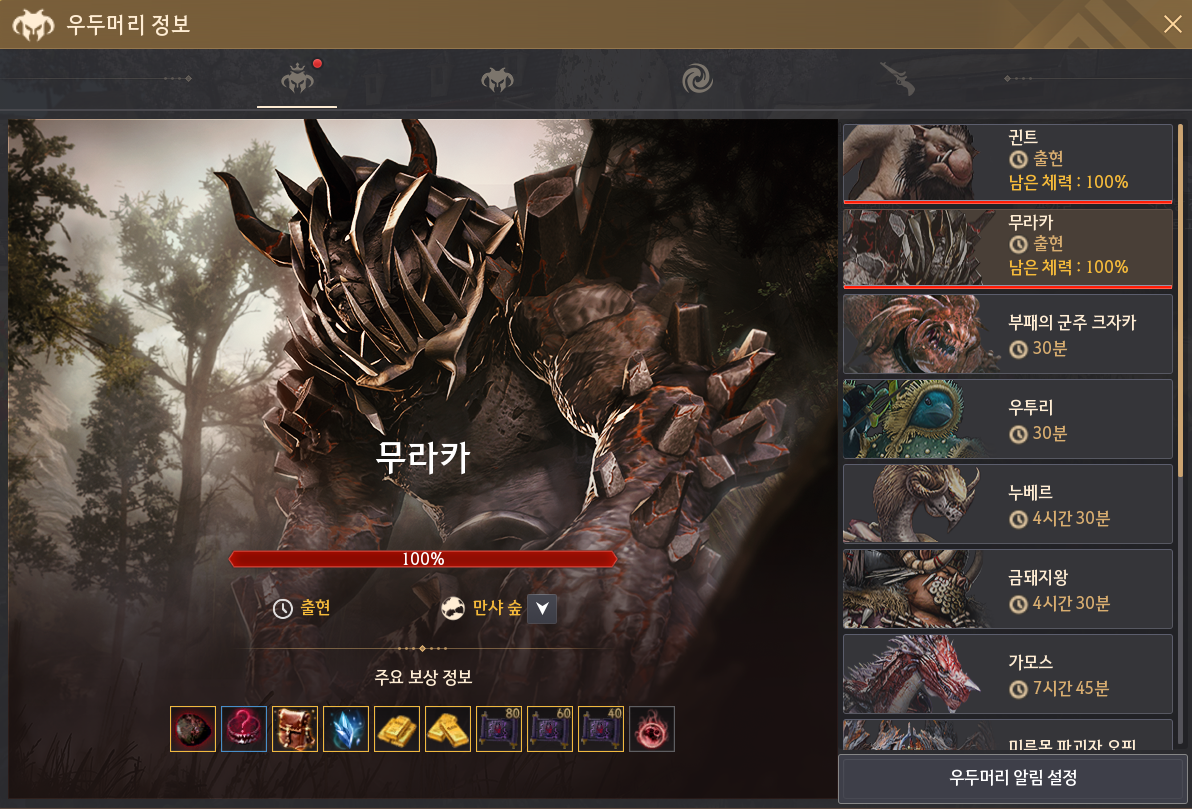
- A boss information UI has been added to allow you to check boss-related information more conveniently.
- You can check this UI by going to ‘Menu (ESC) → Adventure’ or by pressing the Dark Rift button located at the bottom right.
- Boss information is displayed even if you click the boss icon on the world map (M).
- Boss information is displayed as a Boss Information UI, combining the existing Dark Rift and Boss Notification functions into one.
- You can check this UI by going to ‘Menu (ESC) → Adventure’ or by pressing the Dark Rift button located at the bottom right.
- You can check the following information in the Boss Information UI.
- Information on World, Field, Dark Rift, and Hunting Bosses
- Time remaining until the boss appears
- The appearance time is displayed only up to the minute.
- Remaining stamina after appearance
- Path guidance to the selected boss location
※ However, for field bosses and hunting bosses, the time remaining until appearance is not displayed, and the UI indicates that they have appeared based on the server where they appeared.
※ For bosses with random appearance times, the time remaining until appearance is not displayed.
- In the boss information, when a boss appears, it is indicated by a red icon on the top tab.
- The sorting order of the bosses is based on the boss release date.
- Clicking the existing Dark Rift icon in the bottom right corner has been changed to display the integrated boss information UI.
- The transport status UI on the World Map (M) has been changed.
- The transport button icon at the top of the world map (M) has been changed.
- The design of the Guild Information button in the Guild window has been partially modified.
- Part of the design for the settings button in the Friends window has been modified.
- Some ship icons have been modified on the base battle results screen.
System
Improvements to the Black Shrine reward claim method
The method for claiming Black Shrine rewards is being improved. Previously, if you did not manually claim the Black Shrine raid rewards before the next week, you could not receive them. To address this, we have changed the system so that Black Shrine raid rewards are automatically delivered to the Black Spirit’s Gift Box at a designated time, and you can check your raid records in the Reward Acquisition History section of the Black Spirit’s Gift Box.
- The Black Shrine weekly raid rewards have been changed to be delivered to the Black Spirit’s Gift Box.
- Black Shrine raid rewards have been improved so that they are automatically obtained from the Black Spirit’s Gift Box after the rewards are calculated following midnight on Sunday.
- Accordingly, Black Shrine rewards have been changed to accumulate in the Black Spirit’s Gift Box.
- The Black Spirit Gift Box has been changed so that pressing the subjugation reward button opens.
- You can check your subjugation records in the ‘Reward Acquisition History’ of the Black Spirit’s Gift Box.
- The description for the subjugation reward button has been changed.
Red Battlefield Matching System Improvement
- The conditions for starting and maintaining matches in Red Battlefield have been improved, and penalty conditions for not accepting a match have been added.
- After the match acceptance/rejection UI appears, if 30 or more people accept, only those who accepted will be allowed to enter, and those who did not accept will be excluded from the match.
- If you repeatedly fail to press Accept after the matching acceptance/rejection UI appears, a penalty will be applied preventing you from applying for matching for a certain period of time.
Fixes and Changes
- [Kunoichi] Fixed an issue where the wine glass appeared unnatural during exclusive animations when wearing the Lovelian Armor.
- [Striker] Fixed an issue where certain body parts appeared to have holes when wearing the Black Horizon outfit.
- [Wukong] Fixed an issue where the Wukong’s Hair buff was not applied when using the “Drain: Tusita’s Gourd” skill after using certain skills.
- Due to the change that prevents progressing the “Fugar’s Secret to Success” quest, it is no longer possible to receive the book required to accept the quest from Fugar.
- Fixed an issue where the “Burning Beacon” knowledge could not be acquired.
- Fixed an issue where character movement was not smooth when moving near certain cherry trees.
- Fixed an issue where interaction effects did not disappear even after acquiring certain knowledge of the Morning Light.
- Fixed an issue where a Fortress for the Construction-node Node War could not be built in the same area within 1 hour of installing a Conquest War Command Post/Field Headquarters.
- The “Find Item” button, which was not functioning in the Guild Warehouse, has been removed.
- The awkward description regarding the “Continuous Care” skill within the item description for the Harmony Draught has been fixed.
- The issue where effects were not displayed on the Golden Pig Cave statue even though the Golden Pig Cave was open immediately after maintenance has been fixed.
- The issue where the Worker Contract notification was repeatedly displayed upon logging into the game or changing characters for some families has been fixed.
- The issue where scrolling could be performed using the mouse wheel in the Character Switching Settings UI, even though the scroll UI did not appear when the number of characters in a family was between 8 and 14, has been fixed.
- Clicking the shortcut in the Olvia Academy Pass UI has been changed so that the Quick Purchase UI opens instead of the Pearl Shop.
- The location where the ship appears when unloading it in the Starry Midnight Port has been changed.
- The issue where the Ship’s Docking and Departure UIs were obscured by the Skill Guide UI has been fixed.
- The issue where the Warehouse UI displayed appeared unnatural when pressing [Royal Workshop – Node Management – Open Warehouse Button] on the World Map (M) has been fixed. Fixed an issue where the Basilisk Lair was displayed when selecting Filter → Mining in the Fish Base on the World Map (M).
- Fixed an issue where long monster or NPC names were truncated on the 3D minimap and text descriptions could be activated when hovering the mouse cursor over them.
- Client login optimization has been performed.
- [Pad Mode] Fixed an issue where the X button did not appear in the Pearl Shop Purchase UI when using the dedicated pad UI.
- [Pad Mode] Fixed an issue where the party finding function was not working in Sequence and Black Shrine (Donghae).
- [Pad Mode] Fixed an issue where the key guide for learning skills was displayed incorrectly while conversing with Combat Instructor Cliff at Olvia Academy.
- [Pad Mode] Fixed an issue where an exclamation mark icon was displayed in the Guild Boss Raid UI when summoning a Guild Boss for which the summon cutscene does not play.