Details of the update for the Global Lab BDO test server, which was released on Friday, July 31, 2026.
Please note that Black Desert test server update information applies specifically to the test server itself and is subject to change when the official servers are updated.
Guild Fame
 Guilds are an integral part of Black Desert, bringing Adventurers together to share adventures, create stories, and make lasting memories.
The new Guild Fame system turns your individual activities into your guild’s growth, which in turn provides benefits for you. Guild members can earn Guild Fame through various activities and unlock guild-wide benefits based on their Guild Fame. Guild Fame can also be spent to activate special effects. By encouraging guilds to earn and replenish the Guild Fame they spend, we hope to make guild activities more engaging.
We hope you continue to enjoy adventuring with your guild and create lasting memories with the Guild Fame system.
- Added a guild fame system that can be earned by participating in various guild activities and provides benefits to the entire guild based on the points accumulated.
Gaining guild fame
- Guild fame can be gained by interacting with guild members and participating in guild activities.
- Guild fame can be accumulated to a maximum of 1,000,000.
| activity | Fame gained for each action |
| For each guild member who joined the guild | 50 |
| Complete a guild quest once. | 1000 |
| Defeat 1 type of guild boss | 10 000 |
| Victory in the Guild Leaguer | 500 |
| Victory at the Blue Battlefield | 5000 |
| Winning the node war (Lvl. 1) | 5000 |
| Winning the node war (Lvl. 2) | 25 000 |
| Winning the node war (Unlimited) | 35 000 |
| Victory in the Conquest war (Lvl. 1) | 50 000 |
| Victory in the Conquest war (Lvl. 2) | 75 000 |
| Victory in the Conquest war (Unlimited) | 100,000 |
| Victory in the Wars of the Roses | 150 000 |
※ You will not be able to earn guild fame for defeating one type of guild boss raid from Monday, August 3rd at 12:00 AM until the scheduled maintenance begins, or for completing one guild quest from Wednesday, August 5th at 12:00 AM until the scheduled maintenance begins.
Benefits of Guild fame
- Guild fame allows you to receive various benefits that apply to the entire guild, depending on the accumulated indicators.
- Purchasing each passive skill costs 1 guild point.
- Daily salary supplement is a method whereby an additional amount is paid in the form of a bonus to the established daily salary.
- Example) If the daily salary is 5 million silver and the accumulated guild fame is 900,000 or more: Earn a total of 50 million silver (daily salary 5 million + additional bonus 45 million).
- The additional daily salary bonus does not consume guild funds.
| Total Guild Fame | Increase the number of daily guild quest refills (total number of refills) | Daily additional salary bonus | Advantages |
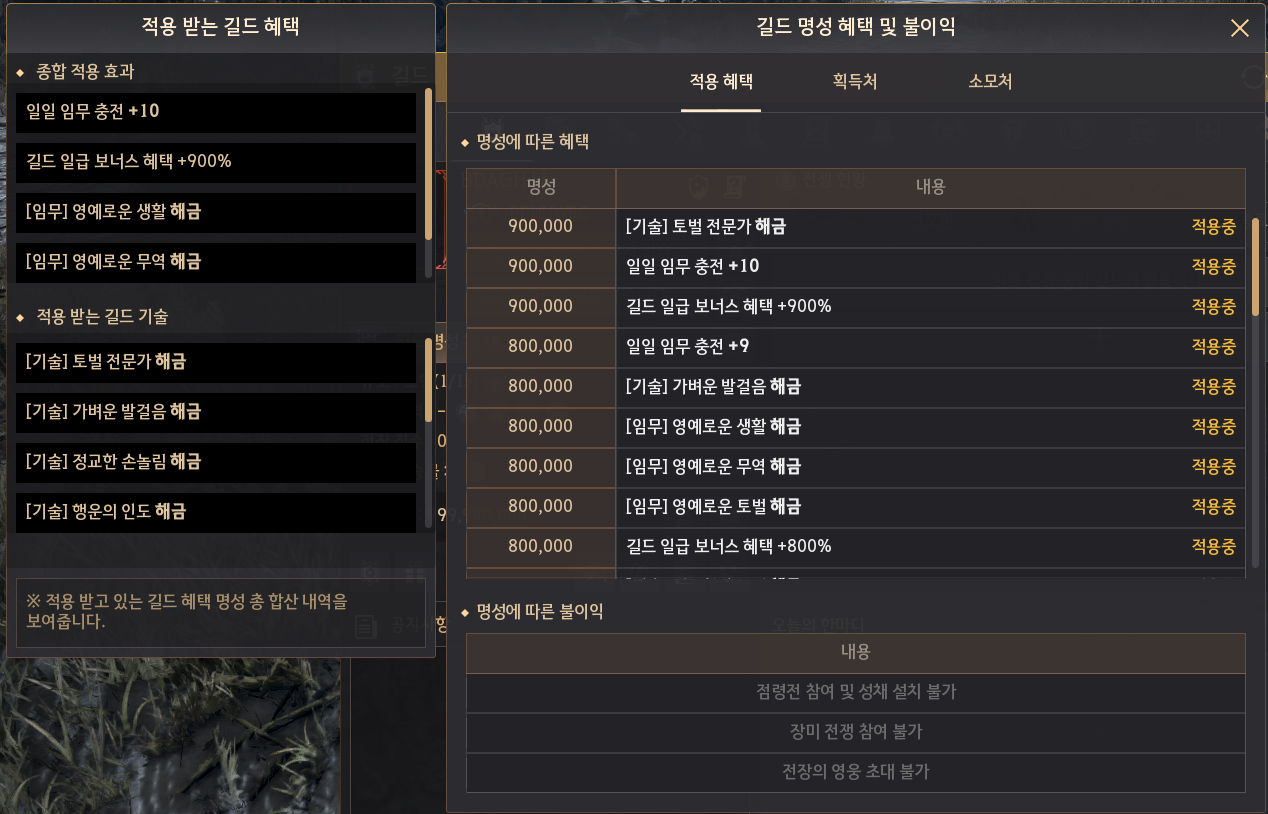
| 900 000 | +1(20) | 900% |  [Passive Skill – Hunting Expert] Extra AP Against Monsters +8 |
| 800 000 | +1(19) | 800% |  [Passive Skill – Light Steps] Increased maximum weight by +100 LT “Honorable” guild quests for hunting, crafting, and trading have been added. |
| 700 000 | +1(18) | 700% |  [Passive Skill – Graceful Hands] Life Skill Mastery +50 |
| 600 000 | +1(17) | 600% |  [Passive Skill – Fortuna] Item Drop Rate +20% |
| 500 000 | +1(16) | 500% |  Strengthening the Blessing of Fortuna |
| 400 000 | +1(15) | 400% |  Strengthening the Guru’s Touch |
| 300 000 | +1(14) | 300% |  Strengthening the State of Nothingness |
| 200 000 | +1(13) | 200% |  [Passive Skill – Energetic Hands] Life EXP +50% |
| 100,000 | +1(12) | 100% |  [Passive Skill – Mercenary’s Oath] Combat EXP +100% |
| 50 000 | +1(11) | 50% | – |
| – | 0(10) | 0% | – |
- A menu has been added to the guild interface that allows you to view benefits, promotions/demotions, and the history of changes in the guild’s fame depending on its level..
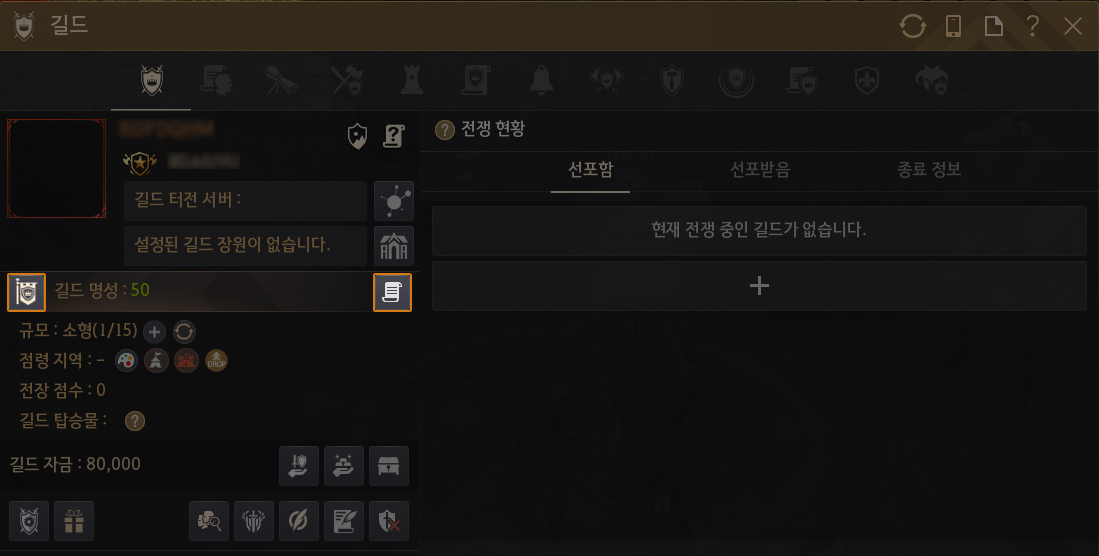
- You can view the benefits and drawbacks of guild fame, as well as the current effects, by clicking the “Benefits, Fame Up/Down” button to the left of the “Guild Fame” section.
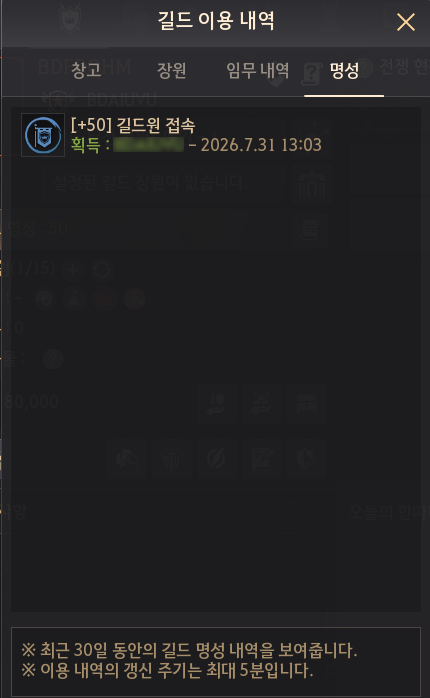
- A Fame tab has been added to the Usage History button to the right of the Guild Fame button, allowing you to track the history of increases and decreases in guild fame .
- The effects of the guild skills “Blessing of Fortuna”, “Guru’s Touch” and “State of Nothingness”, which are enhanced depending on the guild reputation, are as follows:
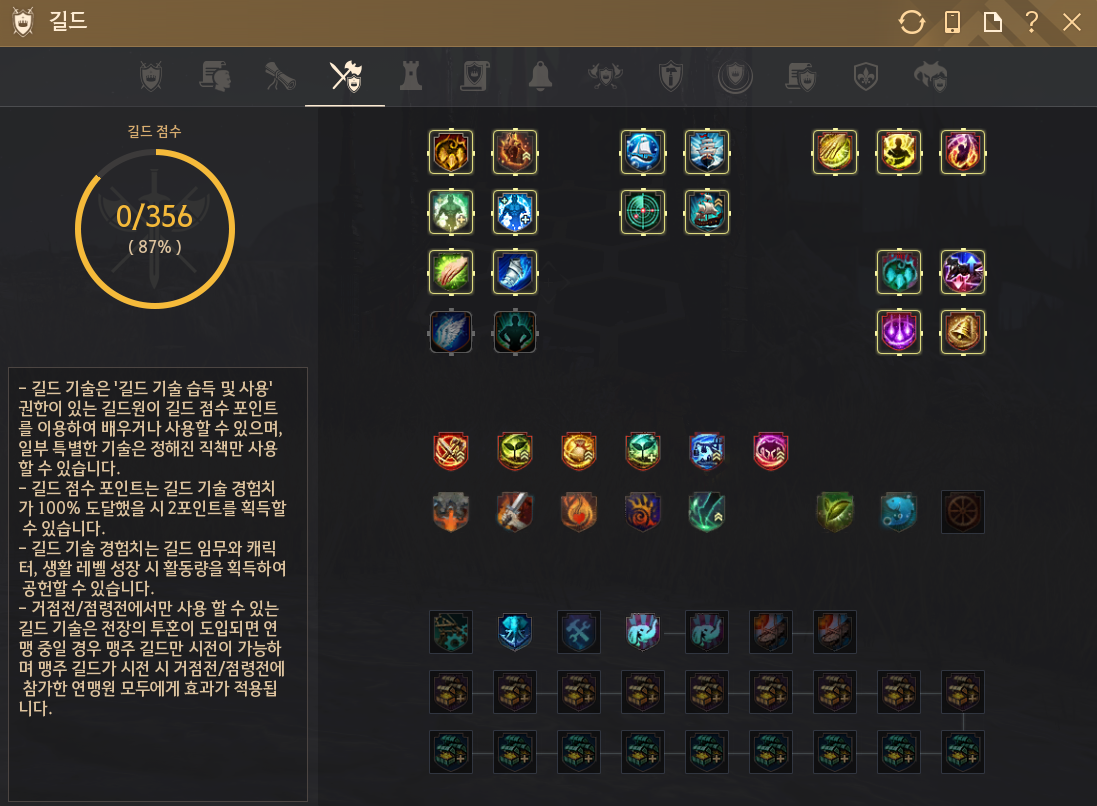
- Due to the addition of new guild skills, the location of skills in the “Guild Skills” tab (G) has changed.
| Before | After |
 Blessing of Fortuna Item Drop Rate +20% Knowledge Gain Chance +15% Higher Grade Knowledge Gain Chance +2% | Generous Blessing of Fortuna Item Drop Rate +30% Knowledge Gain Chance +15% Higher Grade Knowledge Gain Chance +2% |
 Guru’s Touch Life EXP +50% Life Skill Mastery +50 | Exquisite Guru’s Touch Life EXP +75% Life Skill Mastery +75 |
 State of Nothingness Combat EXP +200% & Skill EXP +50% Karma Recovery +15% | Powerful State of Nothingness Combat EXP +300% & Skill EXP +75% Karma Recovery +15% |
- Silver rewards for guild quests have been adjusted, and Honorary quests have been added to the Support, Crafting, and Trade sections, which can be completed if the guild fame is 800,000 or higher.
- For completing quests for the Honorable Guild, silver is awarded for each attempt; other rewards are the same as for regular quests.
- The following guild quests that were not progressing well due to low preference levels have been removed.
- Quest: “Hwanghae Black Shrine” (Normal Difficulty).
- Quest: Gather Timber / Rough Stone
- The number of objectives required for the Mysterious Catalyst quests has been adjusted.
- Before: 80 (Small), 160 (Medium), 240 (Large), 360 (Extra Large)
- After: 150 (Small), 300 (Medium), 450 (Large), 600 (Extra Large)
- The time limit for each Fishing quest has been increased by 1 hour
Расход репутации гильдии
- Guild fame is consumed when using the following features.
- Guild fame can decrease to as low as -2,000,000.
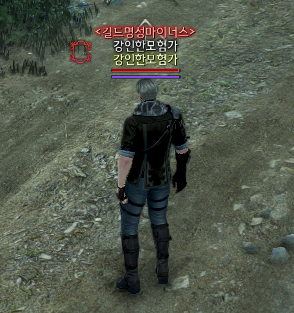
- If a guild’s fame falls below 0, the guild name will be displayed in red.
- If your guild’s fame is below 0, your guild cannot participate in Node Wars, Conquest Wars, or the War of the Roses. In addition, members of that guild cannot serve as Mercenaries for other guilds.
- Guild fame can decrease to as low as -2,000,000.
- However, the guild’s fame will not fall below 0 for any other reductions except those related to declaring war.
- New guild raid bosses, Gumiho and Duoksini, are planned to be added in a future update.
| Consumption options | ||
| activity | Fame cost per attempt | Terms of Use |
| Declaration of war | 400 000 | Fame -1,600,000 or more |
| Resetting the timeout when setting up the primary server | 100,000 | Fame 100,000 or more |
| Restoring the summon counter for one of the existing guild raid bosses | 25 000 | Fame 25,000 or more |
| Additional Gathering Quest | 25 000 | Fame 25,000 or more |
| Golden Bell | 20 000 | Fame 20,000 or more |
- Additionally, guild fame decreases by a certain amount every Monday at 00:00 depending on the guild’s size.
| Guild size | Reducing the amount |
| Small | -2500 |
| Medium | -5000 |
| Large | -7500 |
| Extra Large | -10000 |
Guild Rating UI Changes
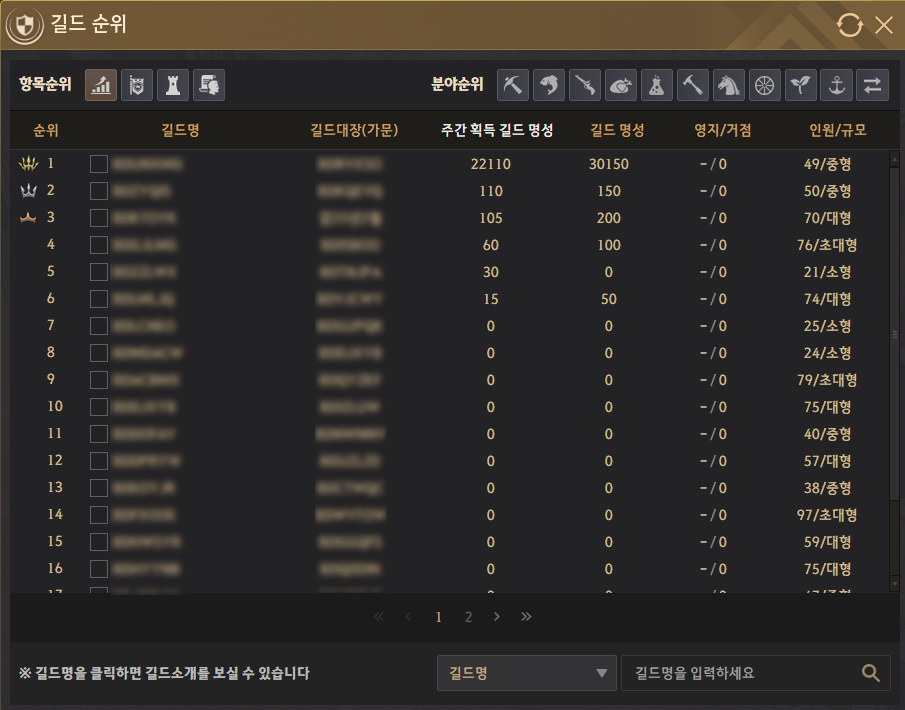
- The following changes have been made to the guild rating system interface:.
- Added items that grant the right to receive guild reputation and a weekly increase in guild reputation.
- The Decisive Battle Score, Score, Guild Introduction, and Guestbook sections have been removed.
Guild War
The guild war declaration system has been revamped.
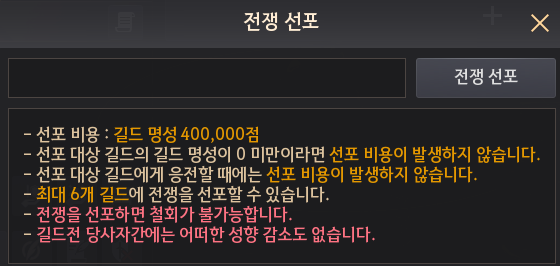
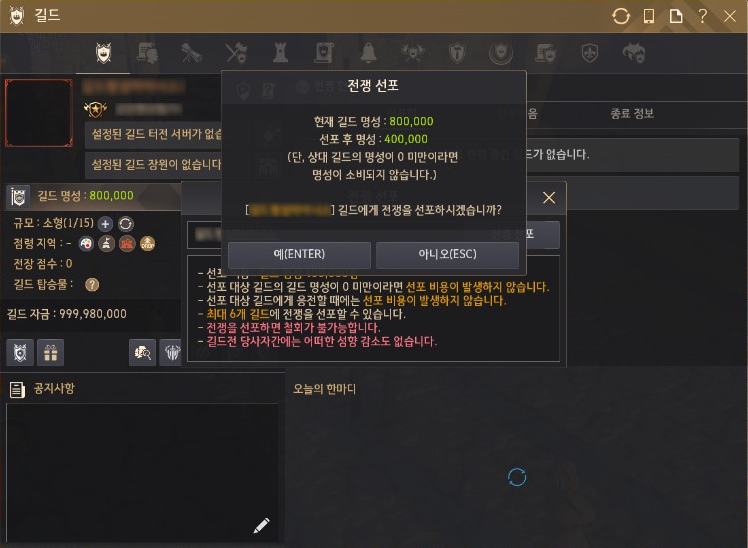
Guilds can now spend 400,000 Guild Fame to declare war without the opposing guild’s consent. However, each war will last only 6 hours, and once it ends, the same guild cannot be targeted again for 48 hours.
Previously, guilds often found themselves subjected to unwanted war declarations. More recently, however, many guilds have expressed frustration over being unable to declare war even when necessary.
With the Guild Fame update, we have revised the guild war system to better balance these concerns.
- You can declare a guild war by spending guild fame points.
- Declaring war costs 400,000 guild fame points.
- A guild war can be declared if there are 10 or more participants online. However, a declared guild war can be responded to without any conditions.
- There is no limit on the size or number of members of a guild that can be declared.
- You can declare war on up to 6 guilds at a time.
- You can declare war on guilds with a reputation below 0 without spending any guild fame.
- You cannot declare a guild war if your guild’s fame is below -1,600,000..
- The declaration of war lasts 6 hours..
- However, if the enemy responds to the war, it will last 7 days.
- You cannot declare war on a guild that has already declared war within the last 48 hours.
- You cannot declare war on guilds for 7 days after creating a guild.
- There is a 5 minute gap between the declaration of war and its actual start.
- When a war is declared, the guild user interface (G) displays the change in fame value that occurred as a result of the war.
- You can check the records of military actions in the menu “Guild (G) – Guild Records”.
- The declaration of war lasts 6 hours..
- The following changes have been made regarding the current Guild War.
- Changes have been made so that guild funds are not spent when declaring a guild war.
- The guild war exit feature has been removed.
- The guild member protection feature has been removed.
- The composition of mercenaries has been changed so that they cannot participate in the war.
Classes

Agent
Main weapon, succession
 Reaper’s Barrage
- Improved character mechanics: now the character turns according to the camera direction during the 1st, 2nd and 4th hits of the skill.
- However, just before the attack is launched, the attack is launched in the direction the camera is facing.
 Firearms Mastery
- Improvements have been made to speed up the transition from the reload animation to the base movement animation after the last hit.
 Flow: Reposition
- Improved the function so that when activated in a forward direction, the character does not pass through monsters.
- Accordingly, the description regarding monster collisions while moving has been changed to “no character collisions when moving backward, left, or right”.
 Mozambique Drill
- It can now be activated during the waiting period.
- During cooldown, skill damage is reduced and effects that increase critical strike chance are not applied.
- The proficiency levels of the following skills acquired during the development stage have been adjusted.
- Mozambique Drill I: Level 5 → 1
- Death Comes Spinnin I: Level 8 → 6
- Mayhem I: Level 12 → 7
- Evasive Detonation I: Level 16 → 7
Class changes
- Skill descriptions for repeating effects (poison, bleeding, pain, HP recovery, MP recovery, etc.) indicate the number of times they are applied during their duration.
- Fixed a bug where duplicate effects would be applied at intervals 1-2 times less frequently.
- [Ranger] Fixed an issue where AP would increase by 1 when acquiring the skill “Succession: Feathers of Lemoria”.
- To maintain this effect, the attack increase of the skill “Prime: Spirit’s Blessing III” has been changed from 2 to 3..
- [Ninja] The attack speed increase effect from the skill “Prime: Shadow Blade” has been transferred to the skill “Succession: Shadow of Darkness”. The attack speed increase effect now activates immediately upon acquiring “Succession.”
- [Lahn] Fixed an issue where using the skill “Core: Eradication” on the spot would result in increased movement range compared to when the skill was not learned.
- [Nova] Fixed an issue where the dismount effect would not be applied when successfully landing a hit with the skill “Black Spirit: Royal Fencing: Remise”.
- [Agent] Improved the ability to stop movement more quickly when moving left or right in a non-combat stance.
- [Agent] Improved gameplay mechanics: fixed a bug where close-range enemies would occasionally become unhittable when using the “Flow: Dash ‘N Fire” skill.
- [Agent] Fixed an issue where the Blink skill description did not display the phrase stating that it is not affected by attack speed.
- [Agent] Improved smoothness: Fixed an issue where the effect when using the skill “Flow: Bullet of Truth” looked unnatural.
- [Agent] Fixed an issue where stamina would not be restored when using the Suppressive Shot skill.
Content
Guild League
A new Guild League season is on the way.
Ahead of the regular season, the week-long Guild League Focus Week event will begin alongside the Guild Fame update. The regular season will run for 4 weeks, starting Aug 26 in Korea and Aug 27 globally, after the Guild League Focus Week event ends.
Team up with your guild members during the event to earn Guild Fame, test your strength, and prepare for the upcoming Guild League regular season.
- The Guild League’s active week will take place after the next official server maintenance.
- The new Guild League regular season is scheduled to run for four weeks, beginning Wednesday, August 26, 2026.
| Guild League Active Week Schedule |
| Korea: After scheduled maintenance on August 5, 2026 (Wednesday) ~ Before scheduled maintenance on August 12, 2026 (Wednesday) Global: After scheduled maintenance on August 6, 2026 (Thursday) ~ Before scheduled maintenance on August 13, 2026 (Thursday) |
Items
Ancient Hammers and Ancient Black Stones Sell Restriction
Ancient Hammers and Ancient Black Stones obtained through HYPERBOOST progression rewards are highly valuable during the early and mid-game stages. To prevent accidentally selling them, these items can no longer be sold to NPC vendors. Adventurers who no longer need them can process them via Heating to convert them into Cron Stones.
- The following items have been modified so that they are no longer sold in the store.
 Ancient Hammer (V)
- Ancient Hammer (VI)
- Ancient Black Stone (V)
- Ancient Black Stone (VI)
- Ancient Black Stone (VII)
 Ancient Hammer (V)
 Ancient Hammer (VI)
 Ancient Black Stone (V)
 Ancient Black Stone (VI)
 Ancient Black Stone (VII)
- Added a new crafting recipe for the Obsidian Hammer.
- 200 Cron Stones can be obtained by processing (L) – Heating.
- When heating the Obsidian Hammer, the item disappears.
- 200 Cron Stones can be obtained by processing (L) – Heating.
Monsters
New World Boss – Dark Bonghwang
- Rumor has it that strange and frightening energies periodically emanate from the homes of Sangoon, Uturi, Bulgasal, and the Golden Pig King, the world bosses of the Land of the Morning.
- When the World Bosses Sangoon, Uturi, Bulgasal, and the Golden Pig King spawn, there is a chance that a new World Boss, Dark Bonghwang, will spawn in their place.
- The Dark Bonghwang appears in the existing location “Morning Land: World Boss”.
- When the World Bosses Sangoon, Uturi, Bulgasal, and the Golden Pig King spawn, there is a chance that a new World Boss, Dark Bonghwang, will spawn in their place.
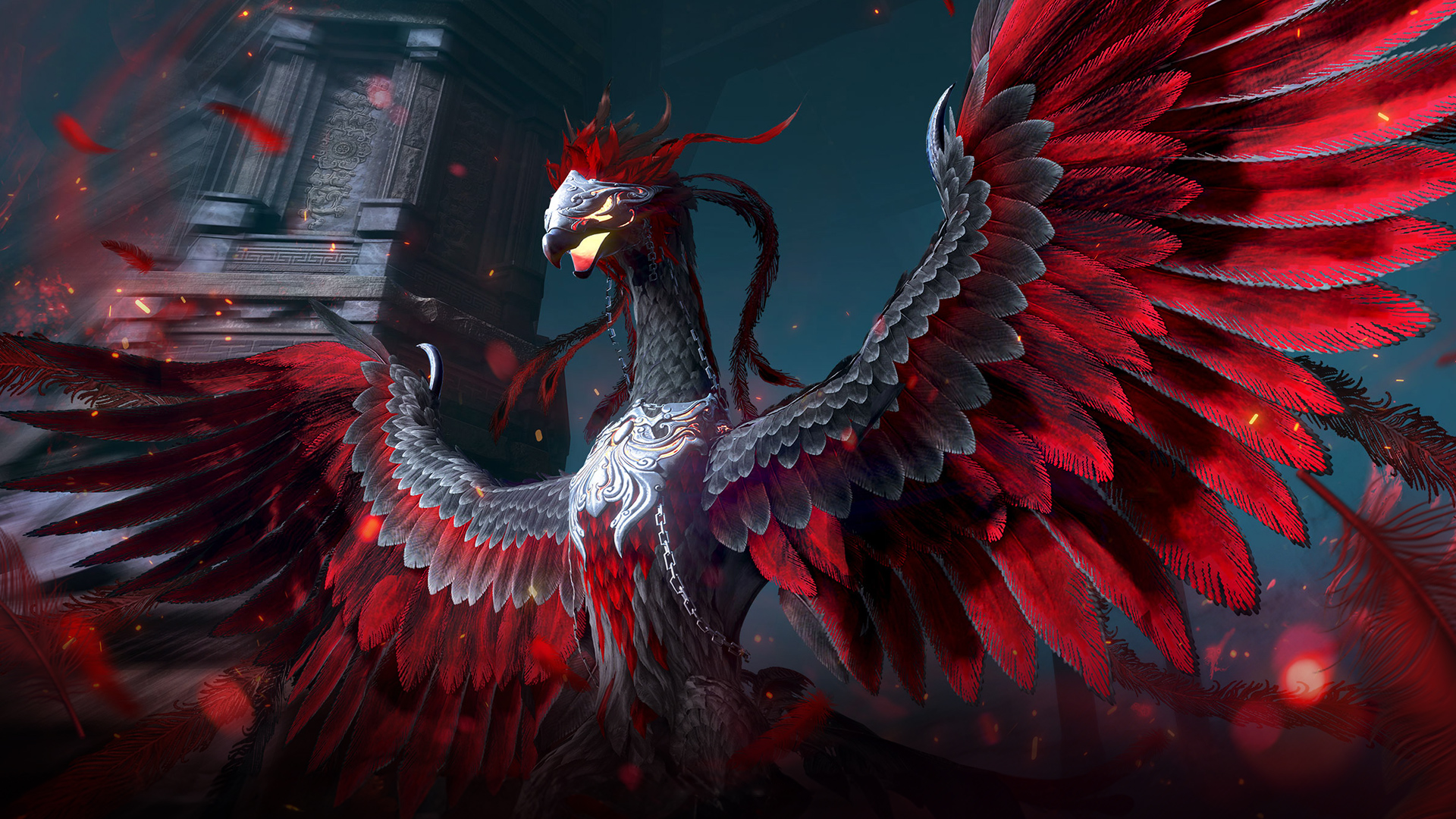
- The main loot that can be obtained by defeating the Dark Bonghwang is as follows::
| Top-1-20 contribution of damage | 21-50 contribution of damage | 51-90 contribution of damage | 90-100 contribution of damage |
    Guaranteed reward Embers of the Primordial х4 Morning Light Boss Token х4 Gold Bar 1 Kg х1–2 Gold Bar 100 G х9–12 Gold Bar 10 G х10–20 Gold Bar 1 G х10–25 Black Stone х20–30 Hunter’s Seal х5–10    Reward based on a given probability Flame of the Primordial х1 Dark Bonghwang Feather х1 (new) Dark Bonghwang Tear х1 (new) Faint Dark Hunger Box х1 Faint Origin of Dark Hunger х1 Caphras Stone Bundle х1 Advice of Valks (+40) Advice of Valks (+60) Gold Bar Box х1 | Guaranteed reward Embers of the Primordial х3 Morning Light Boss Token х4 Gold Bar 1 Kg х1–2 Gold Bar 100 G х6–9 Gold Bar 10 G х5–10 Gold Bar 1 G х 5–15 Black Stone х15–25 Hunter’s Seal х3–7 Reward based on a given probabilityFlame of the Primordial х1 Dark Bonghwang Feather х1 (new) Dark Bonghwang Tear х1 (new) Faint Dark Hunger Box х1 Faint Origin of Dark Hunger х1 Caphras Stone Bundle х1 Advice of Valks (+40) Advice of Valks (+60) Gold Bar Box х1 | Guaranteed reward Embers of the Primordial х2 Morning Light Boss Token х4 Gold Bar 100 G х3–6 Gold Bar 10 G х5–10 Gold Bar 1 G х5–15 Black Stone х15–25 Hunter’s Seal х3–7 Reward based on a given probabilityFlame of the Primordial х1 Dark Bonghwang Feather х1 (new) Dark Bonghwang Tear х1 (new) Faint Dark Hunger Box х1 Faint Origin of Dark Hunger х1 Caphras Stone Bundle х1 Advice of Valks (+40) Advice of Valks (+60) Gold Bar Box х1 Gold Bar 1 Kg х1~2 | Guaranteed reward Embers of the Primordial х1 Morning Light Boss Token х4 Gold Bar 100 G х2–4 Gold Bar 10 G х 3–6 Gold Bar 1 G х5–10 Black Stone х3–7 Hunter’s Seal х1–3  Reward based on a given probability Advice of Valks (+40) Advice of Valks (+30) |
- The Dark Bonghwang Feather, a trophy obtained by defeating the Dark Bonghwang, can be exchanged for the following items with Heo Seungwon, a luxury merchant on the Yukjo Street in the Land of Morning.
- The exchange list is only displayed if you have a Dark Bonghwang Feather in your inventory (I).
| Product name | The required amount of Dark Bonghwang feathers |
 Bountiful Feast | 3 |
 Traditional Tea & Snacks | 3 |
 Assorted Kimchi | 3 |
 Yeolgujatang | 3 |
 Mystical Herbal Medicine | 3 |
 Refined Feast | 1 |
 Assorted Tteok | 1 |
 Tricolor Namul | 1 |
 Gujeolpan | 1 |
 Mellow Herbal Medicine | 1 |
- A large amount of Dawn Essence can be obtained from Dark Bonghwang Tears using the following crafting recipe.
- If you process 10 times more crafting materials and 1 unit of black stone powder, then in mass production you can get 10 times more results.
| Processing – Simple Alchemy | Result | |
  Dark Bonghwang Tear х1 + Essence of Dawn – Black Spirit’s Rage х1 | Essence of Dawn – Black Spirit’s Rage х30 | |
 Dark Bonghwang Tear х1 + Essence of Dawn – Accuracy х1 | Essence of Dawn – Accuracy х30 | |
 Dark Bonghwang Tear х1+ Essence of Dawn – Damage Reduction х1 | Essence of Dawn – Damage Reduction х30 | |
 Dark Bonghwang Tear х1 + Essence of Dawn – Evasion х1 | Essence of Dawn – Evasion х30 | |
- Changed the number of times you can exchange the Primordial Crystal for the Morning Light Boss Token.
- Before: 4 times
- After: 8 times
- [Darkseekers’ Retreat] Fixed an issue where the next stage of monsters would not be summoned if the first monster that spawned was quickly killed after the Mournful Darkseeker respawned.
- The respawn time of the Mournful Darkseeker monster has been adjusted.
- [Gavinya Coastal Cliff] Changed so that the Sulfur Volcano Golem and Sulfur Boulder Golem awaken simultaneously during the first attack after the Sulfur Volcano Golem awakens.
UI
Marni’s Combat Analyzer
Marni’s Combat Analyzer has been added, allowing you to review the flow and results of your combat.
You can now easily view damage dealt, damage taken, DPS (Damage per Second), combat duration, and more. The individual combat analysis provides a more detailed breakdown of your combat records from multiple perspectives.
However, please note that this feature is available only in select content to help ensure server stability.
We hope Marni’s Combat Analyzer serves as a useful tool for testing different setups and skill combos while objectively tracking your progression.
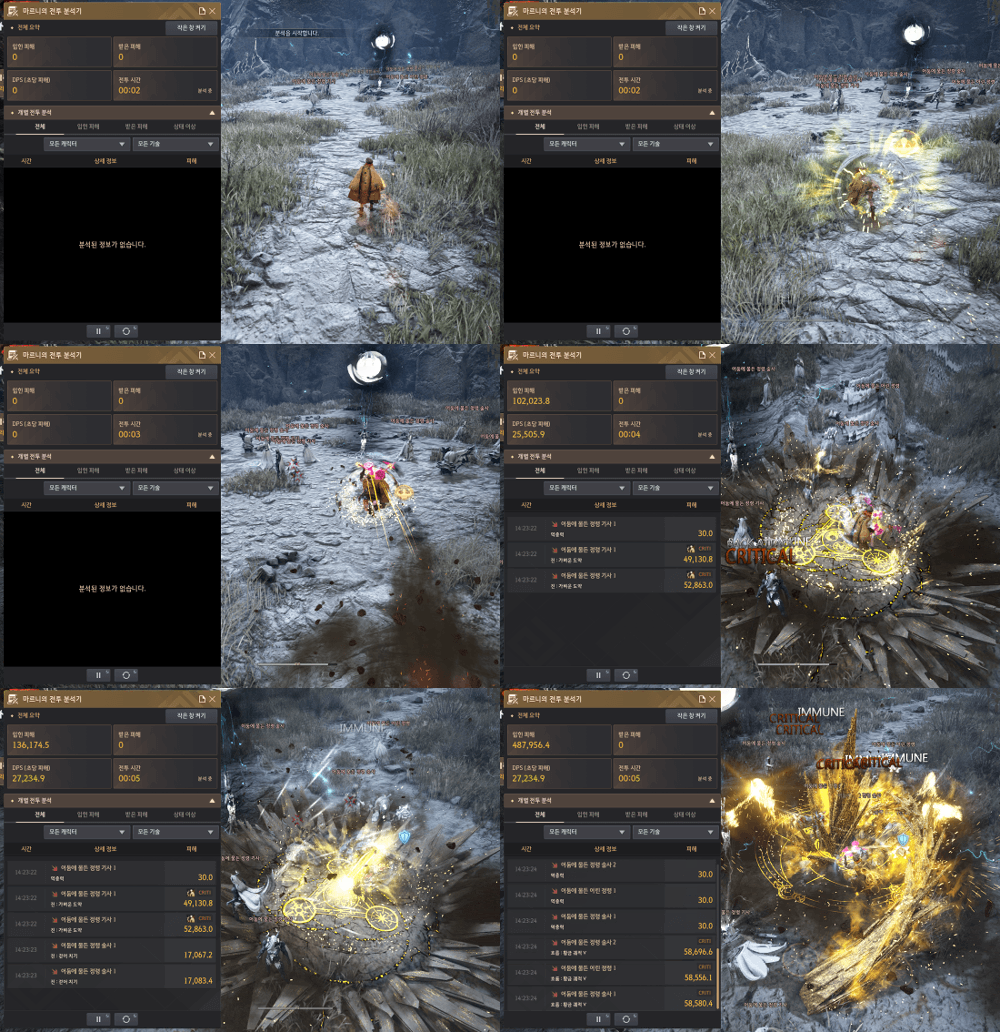
- Added Marnie’s Combat Analyzer
- You can view Marnie’s combat stats in the menu (ESC) – Character (F2) – Marnie’s Combat Stats.
- If the “Hide interface when hit” option is enabled in the game settings when using the combat analyzer, the combat analyzer interface is hidden when you receive a hit, but the recording does not stop.
- However, the widget that appears when you click the small window open button does not hide, even if the “Hide UI on click” option is enabled.
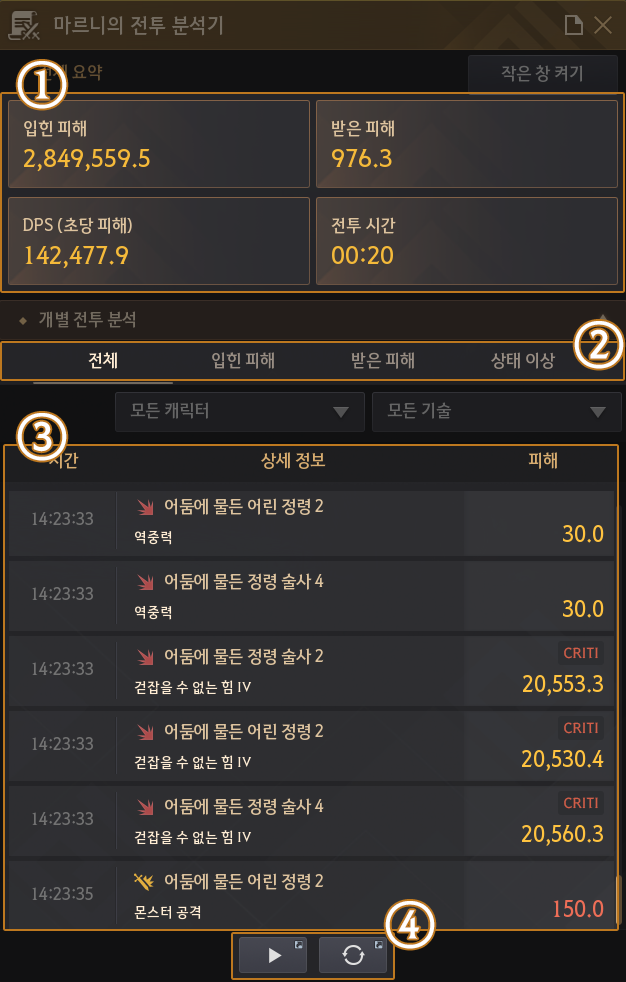
- ① The main area of the screen
- You can check damage dealt, damage received, damage per second, and battle time.
- If the maximum recording time (1 hour 10 minutes) is exceeded, the recording will be reset and available for re-use.
- You can move the window outside the game by pressing the Sticker UI button.
- You can turn widgets on and off using the “Turn on small window” button.
- If the “Hide UI on hit” setting is enabled, Marnie’s combat analyzer interface will disappear when hit. However, widgets enabled using the “Turn on small window” button will not disappear.
- ② Individual battle analysis – Tab button, Filter button
- You can enter the individual battle analysis to view detailed logs.
- You can sort and view logs by damage dealt, damage received, and status effects using the Tab key.
- You can also filter by skill, monster, or character name.
- If the logs contain targets with the same name, a number is displayed after each name.
- You can view information for a specific target by selecting the target using the “All Characters” button and entering a number in the input field.
- You can view logs by skill using the “All Skills” button.
- ③ Individual Battle Analysis – List of records
- In the list of records, you can check the time, detailed information, and damage.
- Time: You can check the recorded time.
- Details: You can check whether damage was dealt or received and view the skill name.
- Damage: You can check the damage amount, status effect type, and whether a critical hit occurred.
- ④ Start, stop and reset recording
- Pressing the “Start Recording” button starts the analyzer, and pressing it again pauses recording.
- The “Start Recording” and “Reset” buttons can be assigned to hotkeys.
- Pressing the “Reset” button deletes the recorded information.
- A detailed guide to using the Marni Combat Analyzer.
※ With the addition of Marni’s Combat Analyzer, the damage display setting in the Black Desert Lab has been removed.
※ With the addition of Marni’s Combat Analyzer, changes have been made to minimize damage applied to effects such as “Charge”, “Pull and Knockback”, “Monster Turn,” and “Aim.”
※ Marni’s Combat Analyzer does not function while mounted, including while riding the Black Wolf.
※ “Down Attack” and “Air Attack” cannot be tested with Marni’s Combat Analyzer in the Black Desert Lab; their addition is planned for the official server.
Changes and fix
- [Musa] Fixed an issue where the chest area of the Citrus costume would appear cut off when changing the body type through the settings.
- [Agent] Fixed an issue where the effect of Sovereign Revolvers and Blackstar Revolvers would be offset.
- Fixed an issue where the appearance of a fallen wagon placed in a specific location would load with a delay.
- Fixed an issue where the number of attempts to complete the Altar of Blood content was displayed as 5.
- If monsters do not spawn periodically in the Zephyros Castle area, the incubator in the Lava Zone will be removed and will respawn.
- Fixed an issue where the category name “[Adventure Support] Inventory Expanding!” in the Recommended Quests tab was displayed incorrectly.
- The following knowledge icons used in Agent Succession quests have been changed.
- Old name, Gannicus
- The only remaining boy, Edward
- Code name, Grim Reaper
- The agent’s deal with Marnie
- Fixed an issue where damage from Breath of Green and Windsong effects would be dealt to Arena of Solare.
- Improvements have been made to the display of carts or harnessed horses in the stable window on the world map (M).
- The time it takes to defeat the Golden Pig King on 8/9/10 has been improved and now starts more accurately from the actual start of the battle..
- The order of fences in my garden list has been changed so that they are displayed in the order they were installed.
- The quest “[Green Artisan] Gatherer Across the Sea” has been changed so that it can be accepted even if you have knowledge of the Green Artisan.
- Improved textures and UI for the Exchange Warehouse and Inventory.
- Fixed an issue where the explanation regarding summoning rights in the guild boss summon description was unnatural.
- Fixed an issue that could, in very rare cases, cause server issues during Yar’s quests.
- Fixed an issue where some Node/Conquest War related system messages were not displayed in the Node/Conquest War related system messages section.
- Changing appearance in certain situations (F4) – Fixed an issue where the character’s pearl costume was not visible when creating a portrait.
- [Tablet Mode] Fixed an issue where the PC version description would not disappear after being displayed when viewing details after selecting the “Charging” option in Allan Serbin’s Landscapes.
- [Tablet Mode] Fixed an issue where treasure maps could not be used with a gamepad.
- [Tablet Mode] Fixed a bug in Sovereign weapon crafting interface whereby having 4 or more Blackstar weapon materials would allow weapons to be locked into empty slots in a certain way.
- [Tablet Mode] Fixed an issue where object snapping in the Battle Capture status board interface was not working correctly.
- [Tablet Mode] Fixed an issue where the key guide was missing from the pop-up that appears after completing Yar selection.
- [Tablet Mode] Improved the key hint in the pop-up window that appears after completing matchmaking for the Battlefield.